
AXI (Advanced eXtensible Interface) is a bus used in high performance, high frequency systems. Unlike APB or AHB, it has the characteristic of having separate write and read channels.
AXI Architecture
The AXI bus operates on the basis of five independent channels.
- Write request, which has signal names beginning with AW
- Write data, which has signal names beginning with W
- Write response, which has signal names beginning with B
- Read request, which has signal names beginning with AR
- Read data, which has signal names beginning with R

The five channels above each have a data signal, a valid signal, and a ready signal, and support a two-way handshake mechanism.
AXI supports data widths of 8, 16, 32, 64, 128, 256, 512, and 1024 bits. The slave sends a response to every write transaction sent by the master to complete the transaction. Unlike the write channel, the read channel does not require a read response because the data is the response.
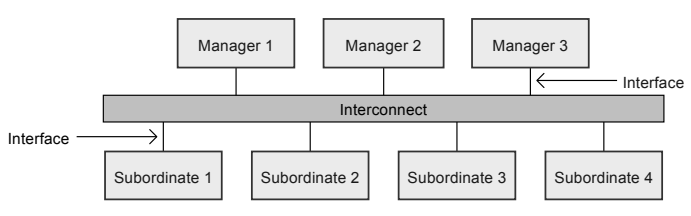
It supports multi-master system, and master and slave are mostly connected through interconnect.
Signals
It's because it's a bus with better performance than APB and AHB, but there are really a lot of signals;;;
Write channel signals
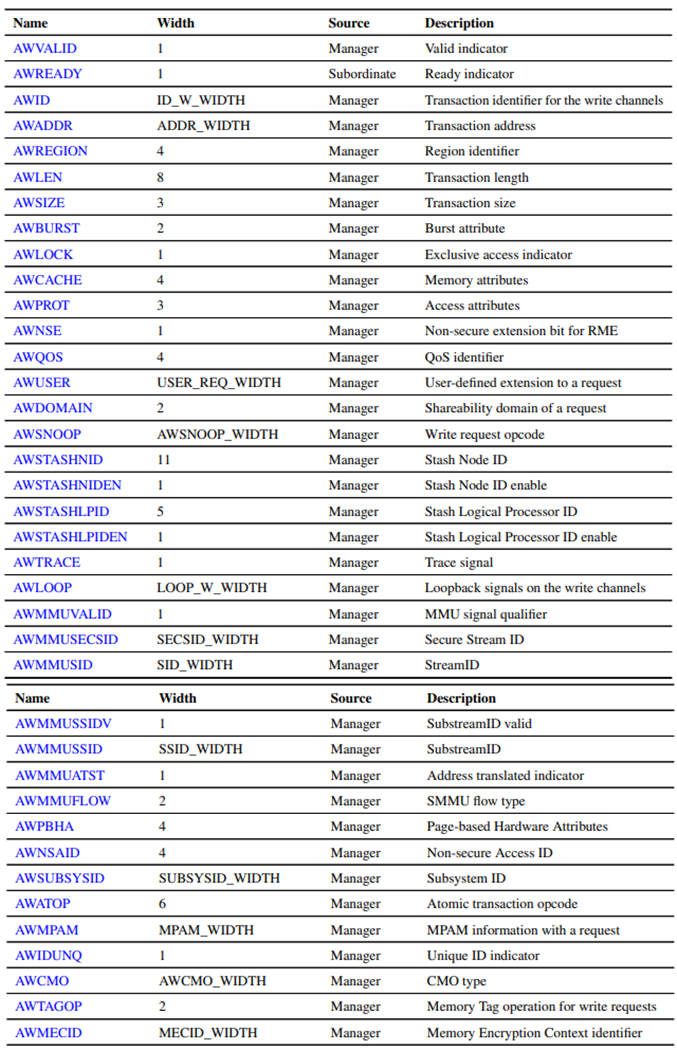
Write request channel signals convey the address and control information required by the master for a write transaction, and begin with ‘AW’.
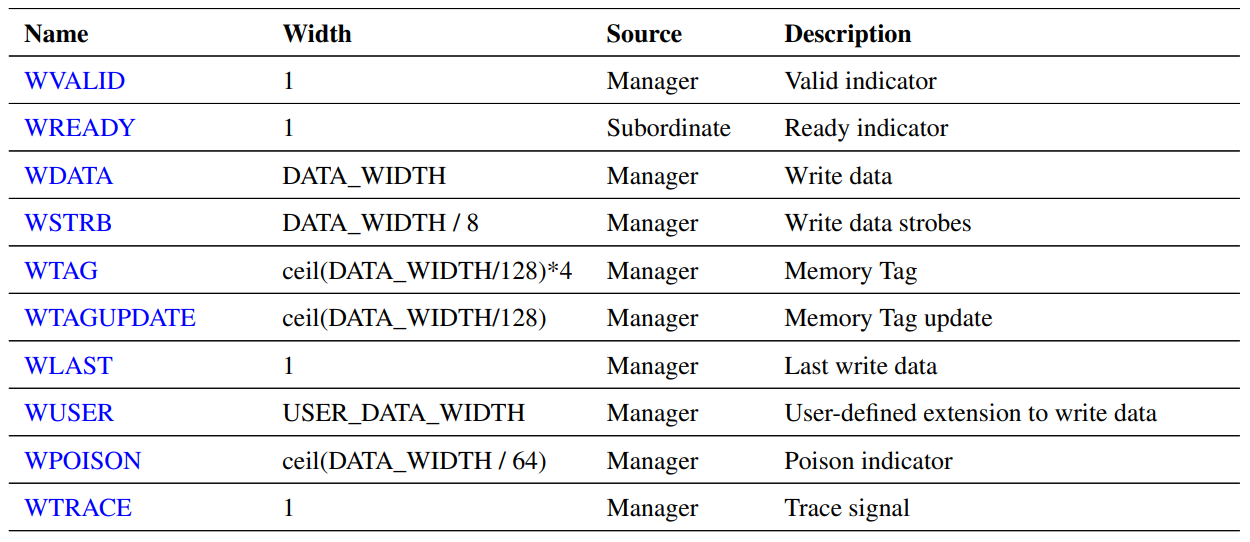
Write data channel signals are also signals sent by the master, contain data and control information, and begin with ‘W’.
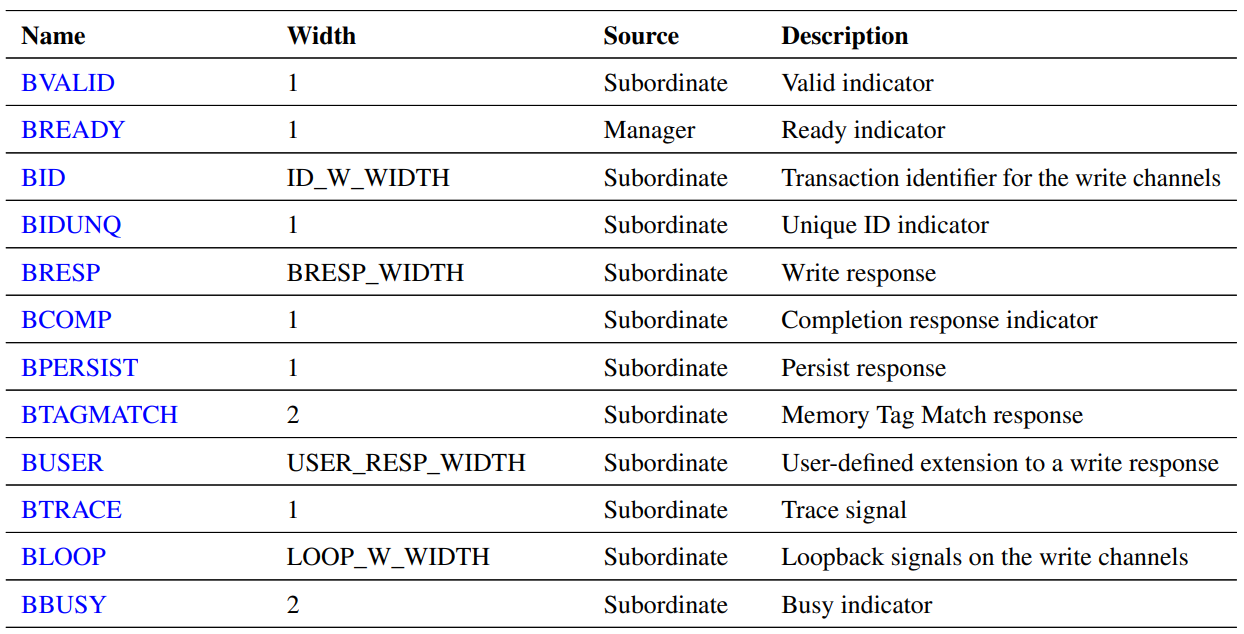
Write response channel signals are response signals sent by the slave and start with ‘B’.
Read channel signals
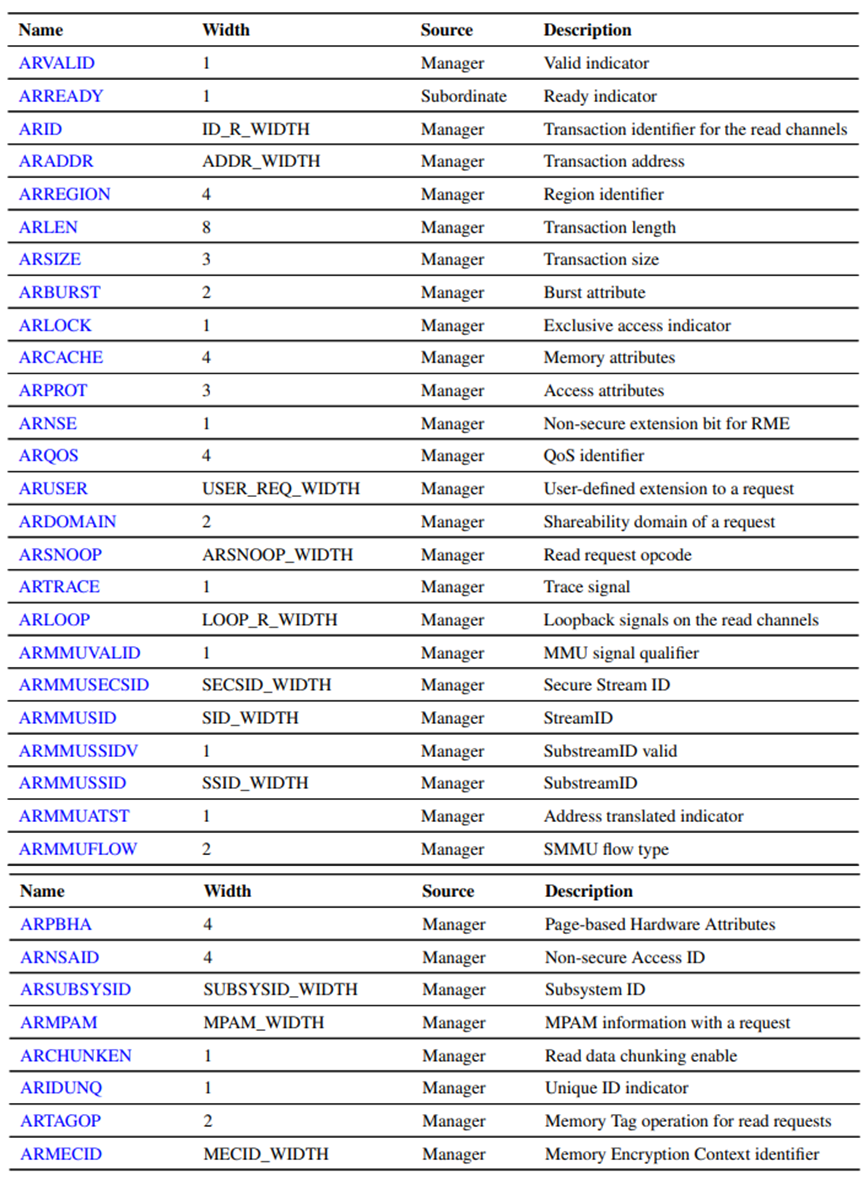
Read request channel signals convey the address and control information required by the master for a read transaction, and begin with ‘AR’.
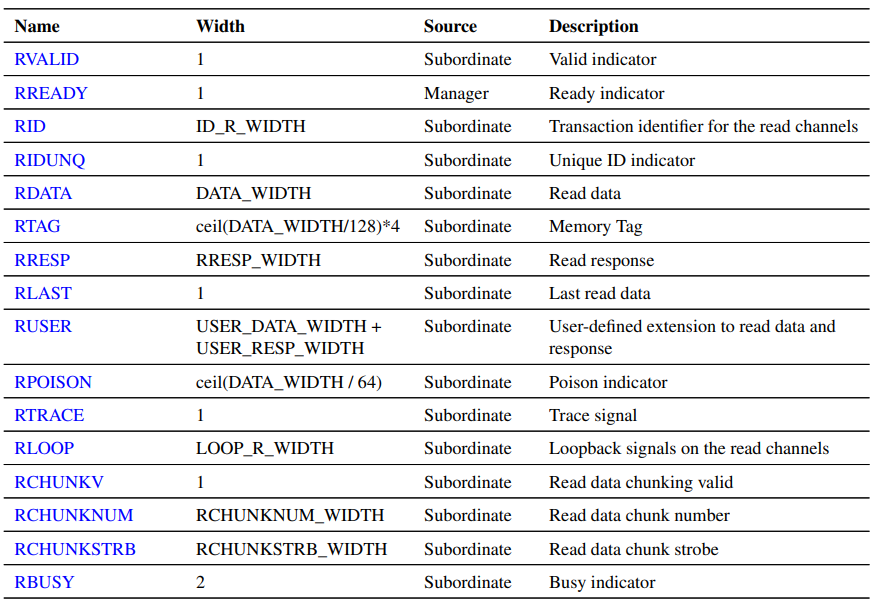
Read data channel signals are read data and response signals sent by the slave, and start with ‘R’.
When in reset state, the master must keep ARVALID, AWVALID, and WVALID low, and the slave must keep RVALID and BVALID low.
AXI transport
Clock and Reset
There must be no combinational path between the input and output signals in the AXI signal. That is, the input signal must have at least 1 ACLK delay to affect the output signal.
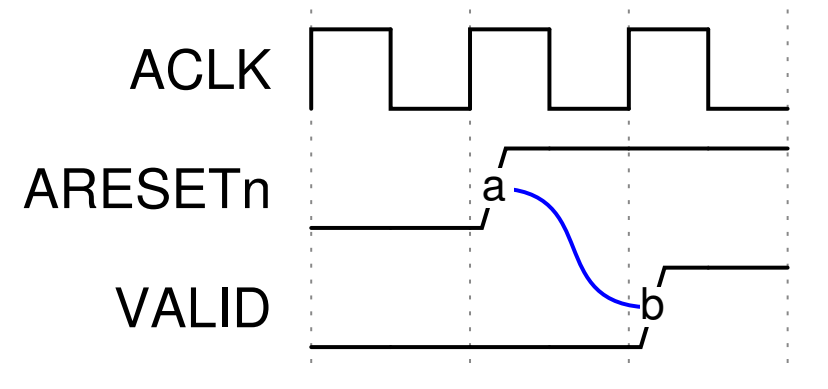
Reset can be asserted asynchronously to the clock, but deassertion must be synchronous to the clock. VALID must be low before reset is released, and the timing when VALID can become high after reset is released is as follows:
Channel handshake
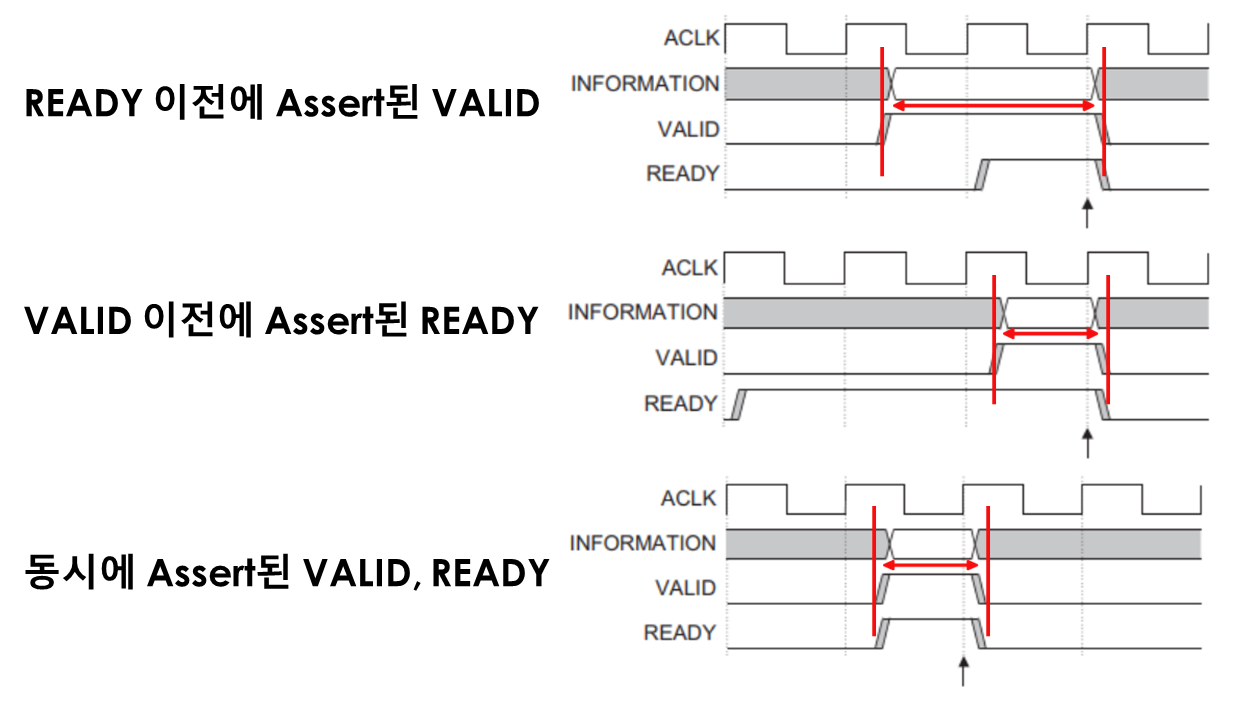
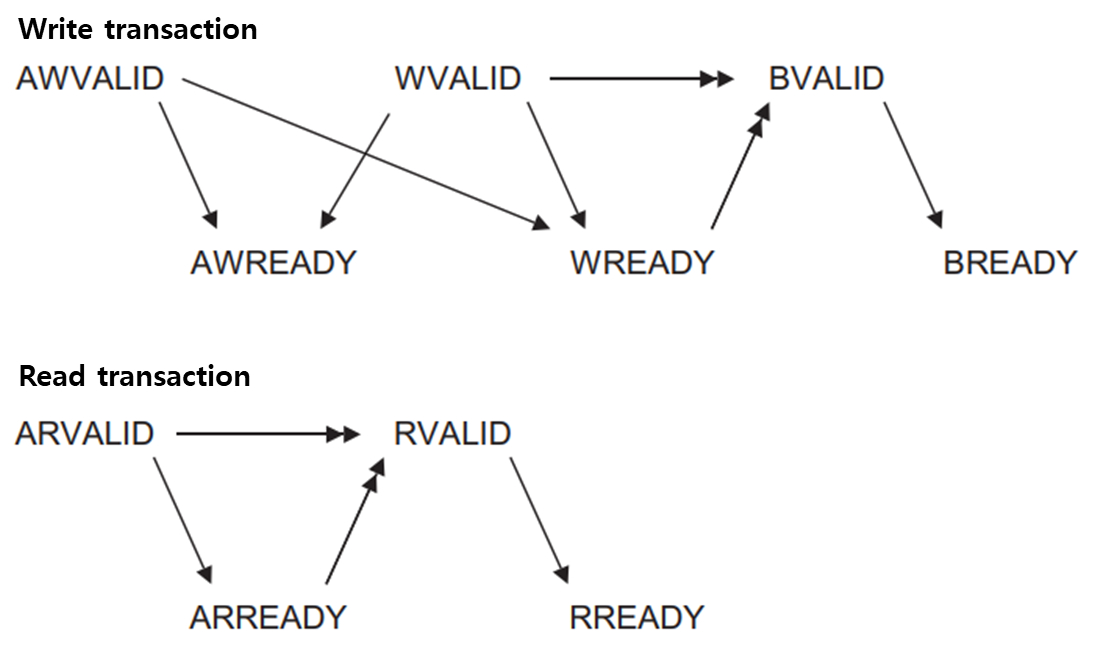
Both Write and Read transactions occur when both the VALID and READY signals are high. The data source sends a valid high signal along with data to the destination, and the destination must then send a ready high signal to complete the transfer. The order in which VALID and READY are asserted is irrelevant. However, from a performance perspective, it's better to assert READY before VALID.
Write transaction
- AWREADY: Can be asserted before AWVALID or WVALID
- WREADY: Can be asserted before AWVALID or WVALID
- BVALID: Cannot be asserted before WVALID or WREADY
- BREADY: Can be asserted before BVALID
Read transaction
- ARREADY: Can be asserted before ARVALID
- RVALID: cannot be asserted before ARVALID or ARREAD
- RREADY: Can be asserted before RVALID
In AXI4, there is a change in handshake dependency when it is a write transaction.
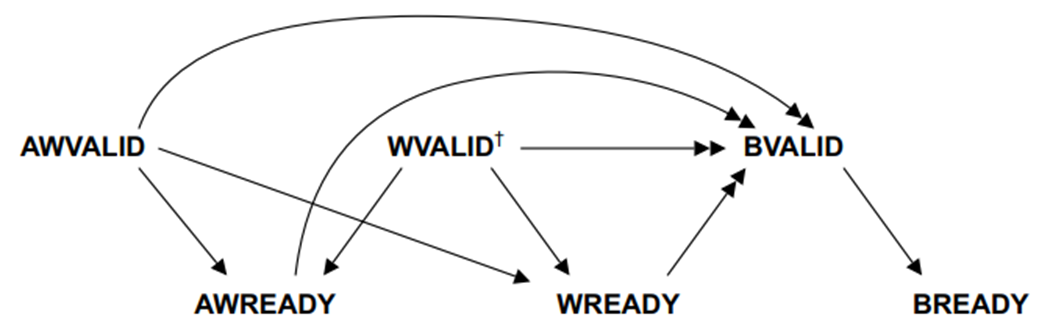
Then, shall we try to understand it by looking at a transaction example in detail?
Read transfer
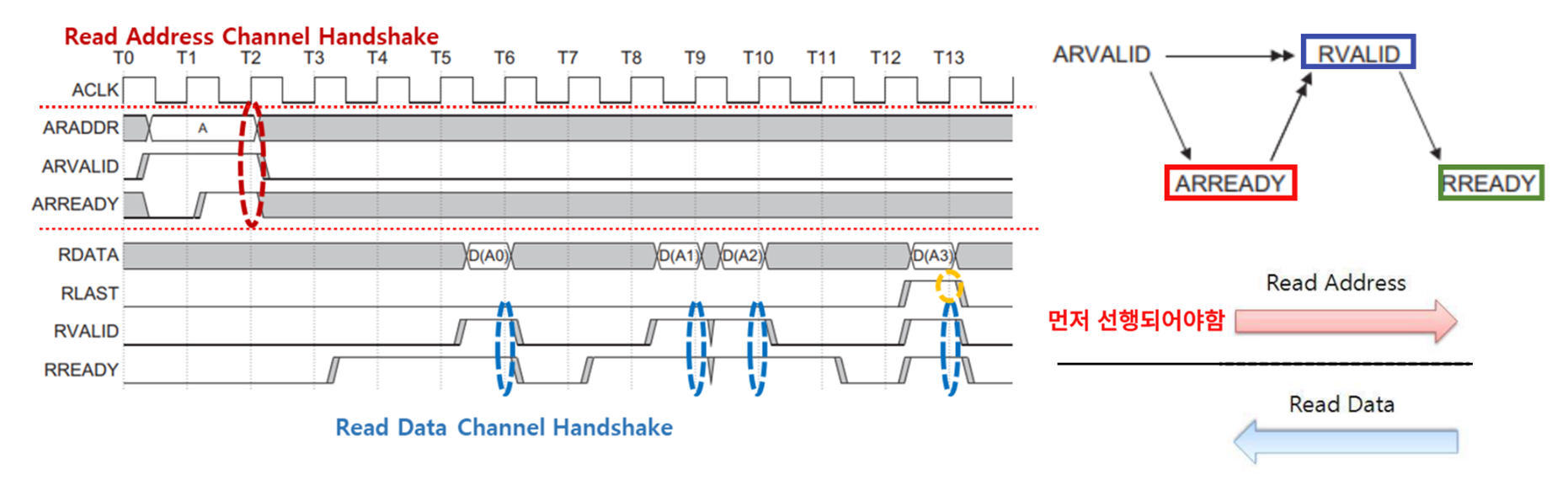
The above example is a 4-read transfer example. Let's look at only the first transfer process.
- T0 ~ T1: Master sends address A and address valid signal
- T1 ~ T2: Notify that the slave is ready to perform a read transaction for the corresponding address (ARREADY)
- T3 ~ T5: Master is ready to receive read data (RREADY)
- T5 ~ T6: Slave sends read data and data valid signals, transaction occurs when both RVALID and RREADY are high.
You can perform read transfers to multiple addresses at once.
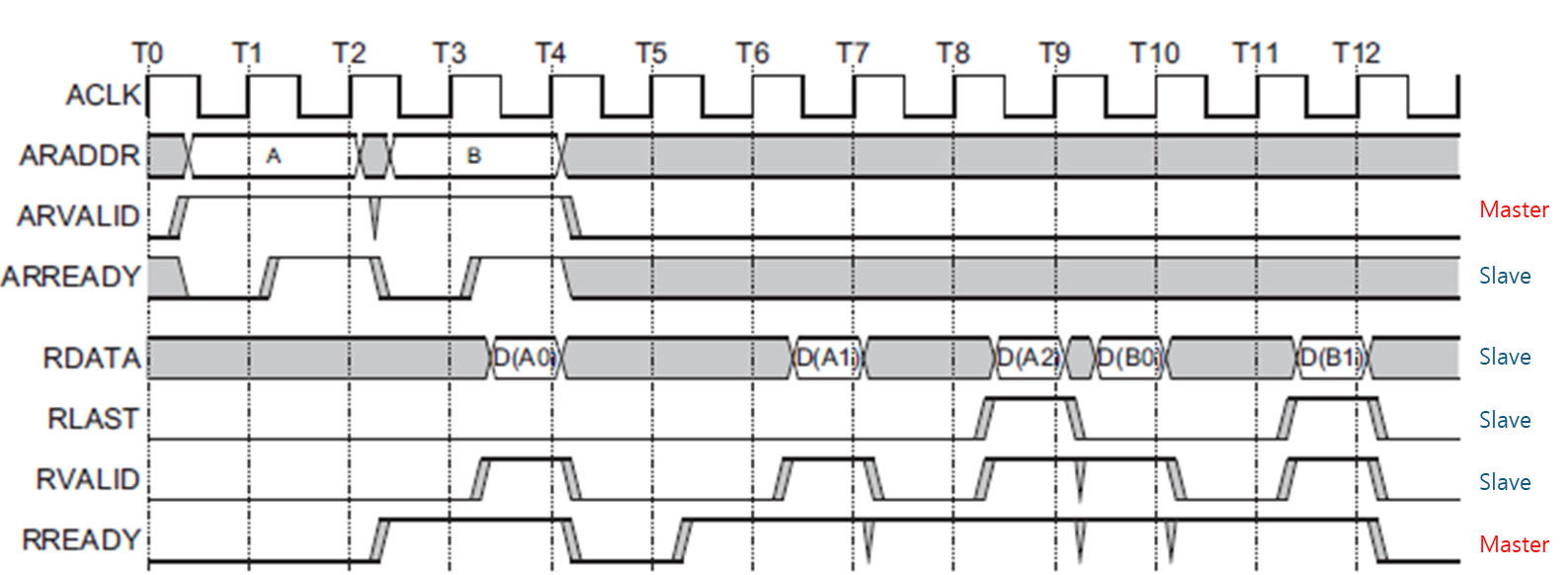
Unlike the AHB protocol, where the Address and Data phases overlap, the AXI protocol transmits the address where the transaction will be performed in advance and then reads the data. When the data transaction for each address is completed, the Slave notifies the Master of the end of the address transaction via the RLAST signal.
Write transfer
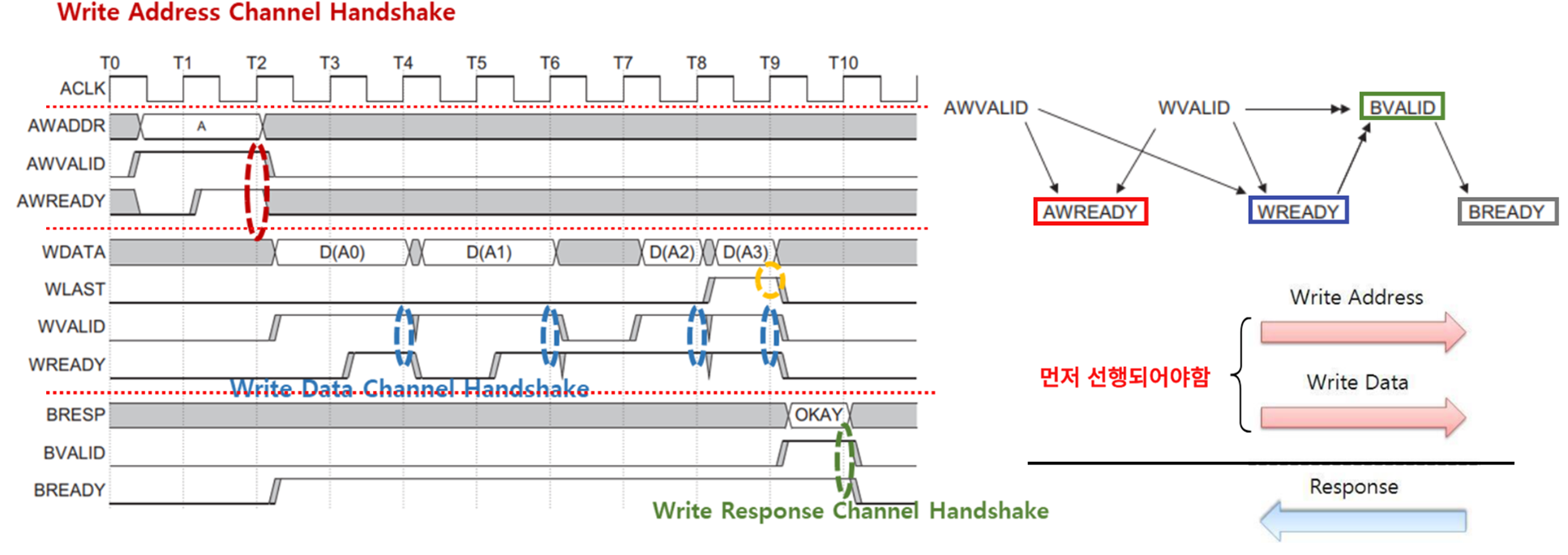
In a write transfer, the master notifies the slave of the last transaction for each address via WLAST. The write channel also has a response signal, so when the slave receives all data and both BVALID and BREADY are high, it indicates a response to the transaction and concludes the communication.
Addressing options
Since the AXI protocol is burst-based, there are options to control it.
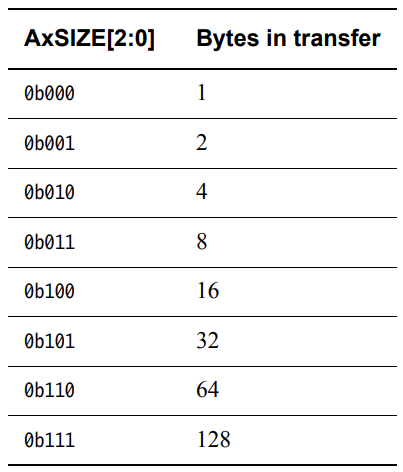
Burst size, AXSIZE[2:0]
Burst size defines the maximum bytes to be transmitted within a burst transfer.
Burst length, AXLEN
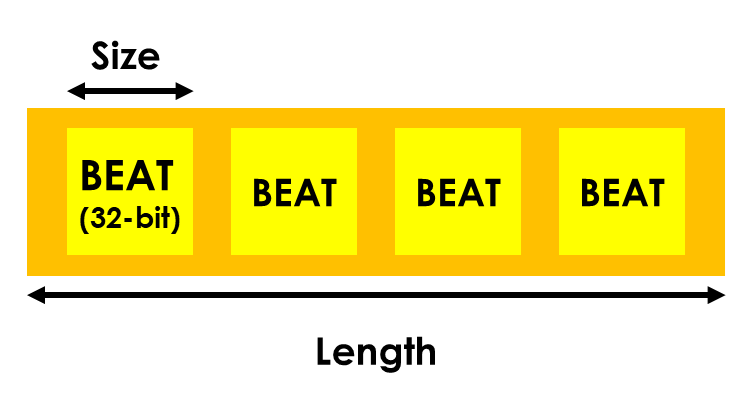
Burst length defines the number of data transmitted in a given transfer. Size x Length is the maximum number of bytes that can be transmitted in a transaction. The actual transmitted bytes will be reduced if the address is unaligned or if the write strobes are not all high.
Please note that AXLEN width varies depending on the AXI version.
AXI3: AXLEN[3:0]
AXI4: AXLEN[7:0]
![AXLEN[7:0]](https://blog.kakaocdn.net/dn/bt2dKg/btsJS7ulXbR/QeC1TccHVYgu5q0AOZizKk/img.png)
- Wrapping bursts, Length -> 2, 4, 8, 16
- Fixed bursts, Length ≤ 16
- Transactions exceeding 4KB address are not allowed.
- Transaction cannot be interrupted midway
Below is an example burst with Size = 3’b10 and Length = 8’h3.
Burst type, AXBURST[1:0]
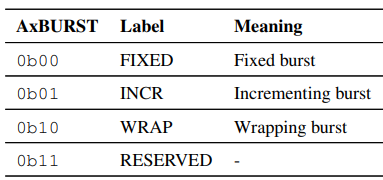
Burst type는 transaction에서 address가 증가하는 방법을 정의합니다.
Fixed burst
- Used when accessing the same address (FIFO)
- All byte lanes are constant, but can be controlled with write strobes.
- Length of the burst ≤ 16
Incrementing burst (INCR)
Address increases steadily from the previous transaction address, used when accessing normal sequential memory.
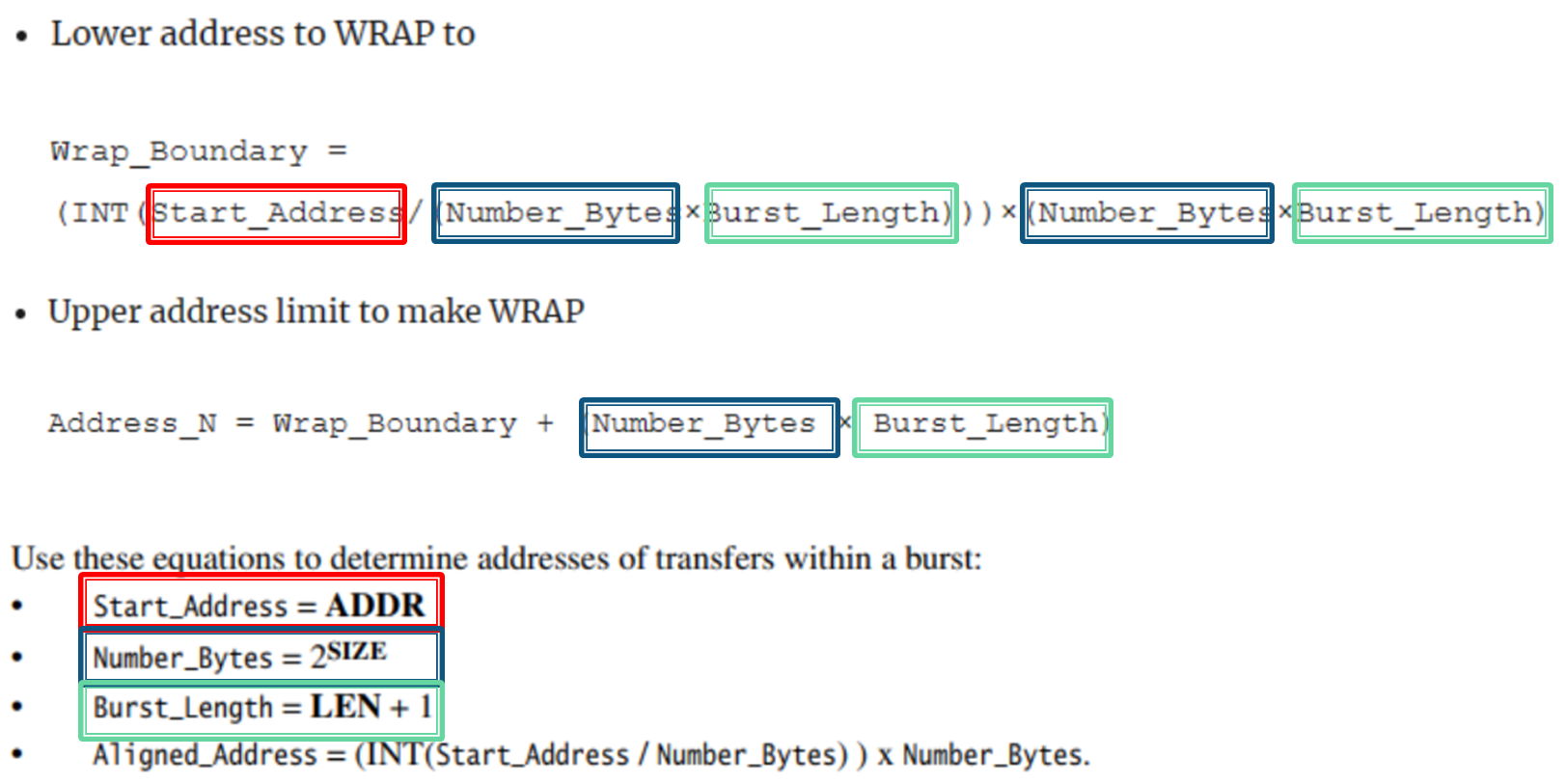
Wrapping burst (WRAP)
Similar to INCR, but the address wraps when it reaches the limit.
- Length of the burst: 2, 4, 8, 16
- Lowest address: Size * Length
- Limit address: (wrap boundary)+ (Size * Length)
Atomic access
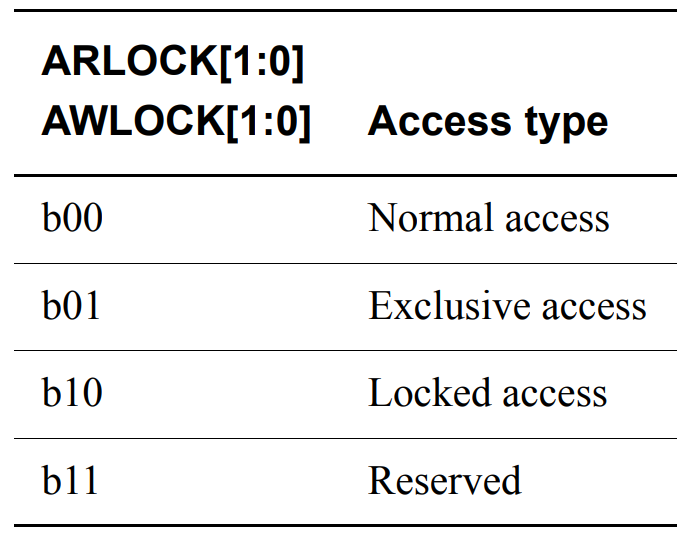
You can select Normal, Exclusive, or Locked access via the AxLOCK[1:0] signal.
Exclusive access is used when a specific master attempts to exclusively access the bus. Unlike Locked access, which prevents other masters from using the bus until the transaction is completed, Exclusive access only checks for intervention from other masters until the transaction is completed. Intervention from other masters is detected through the slave response signals RRESP[1:0] and BRESP[1:0], which has the advantage of not degrading system performance compared to Locked access.
Note that even if Exclusive access is in progress, other Masters can still access it.
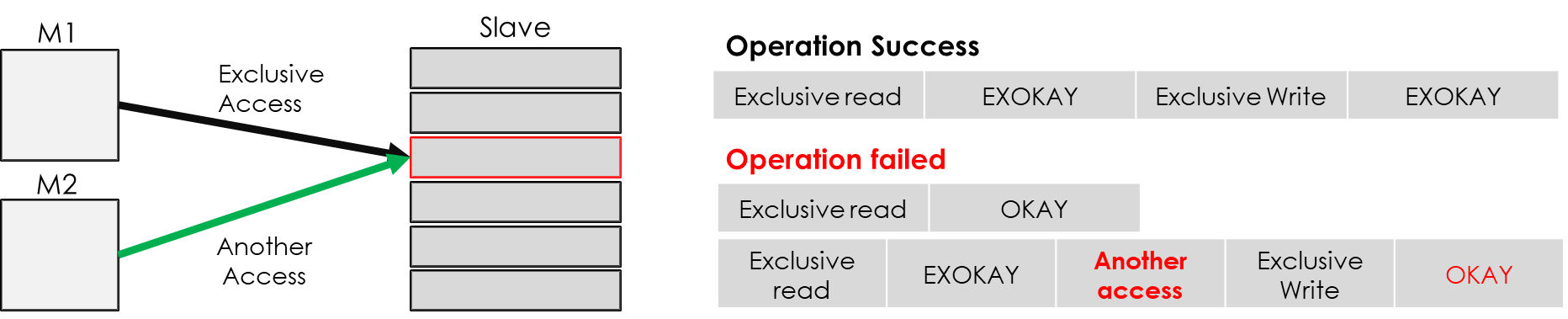
- The size and length of the exclusive write must be the same as that of the previous read.
- The address and control signal for exclusive read and write must be the same.
- Exclusive access addresses must be aligned.
- Exclusive access burst data: 1, 2, 4, 8, 16, 32, 64, or 128 bytes
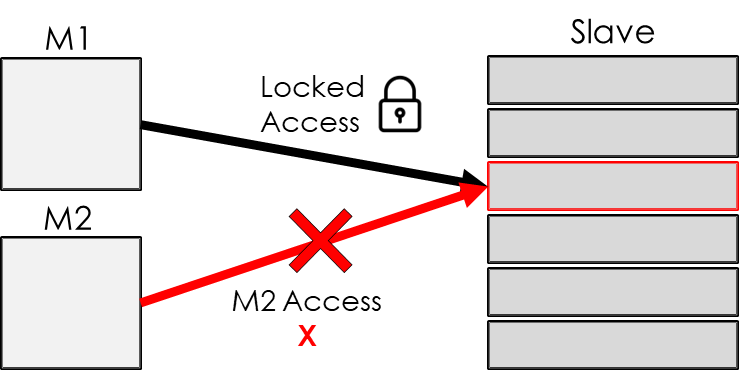
Locked access, which completely restricts access to other masters, has the characteristic of lowering performance and is no longer supported after AXI4.
Transaction response
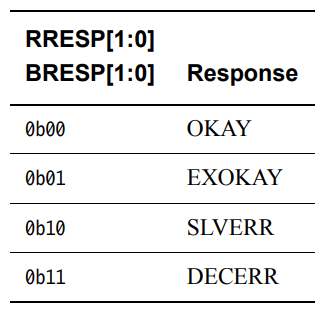
OKAY, normal access success
OKAY is a response that appears when a normal transfer succeeds, exclusive access fails, or the slave does not support exclusive access.
EXOKAY, exclusive access success
It literally means exclusive access success.
SLVERR, slave error
SLVERR는 unsuccessful transaction를 의미합니다.
- FIFO, buffer overrun or underrun
- Attempt to access an unsupported transfer size
- Attempt to write to a read-only device
- Slave time-out
- Attempt to access a disabled/powered-down feature
DECERR, decode error
This occurs when an invalid address is accessed. In this case, the preset default slave sends a DECERR response.
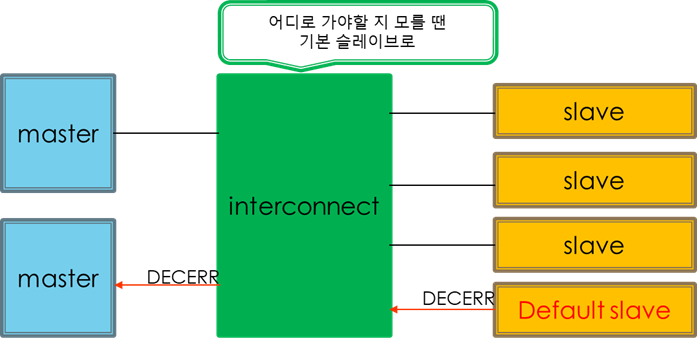
Ordering model
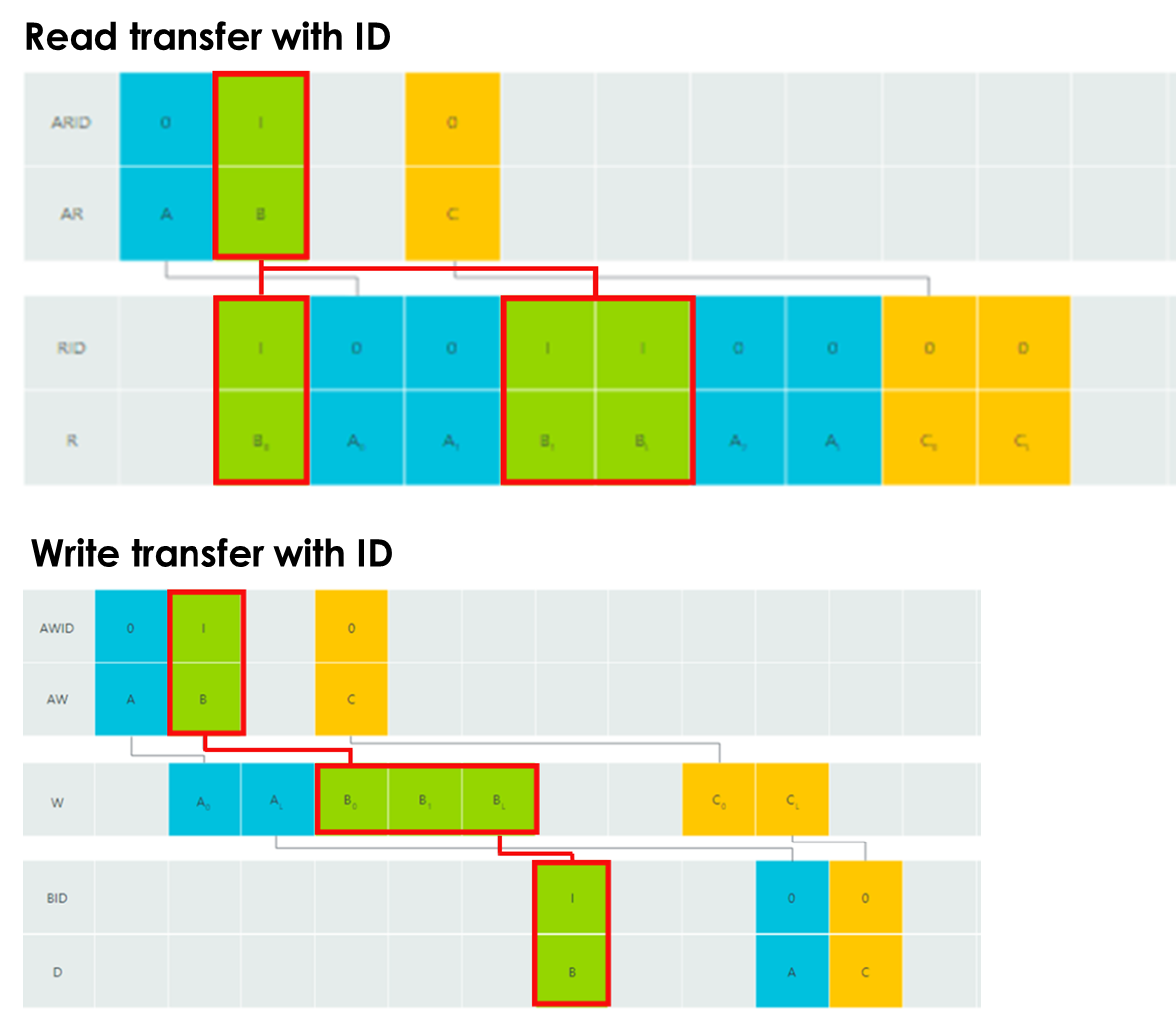
The AXI protocol allows for multiple outstanding addresses and out-of-order transactions via transaction IDs. Transactions with the same ID must be processed in order, but transactions with different IDs are not subject to any restrictions, allowing out-of-order transactions.
- Transactions from different Managers
- Read and write transactions
- Transactions with different IDs
- Transactions to different Peripheral regions
- Transactions to different Memory locations
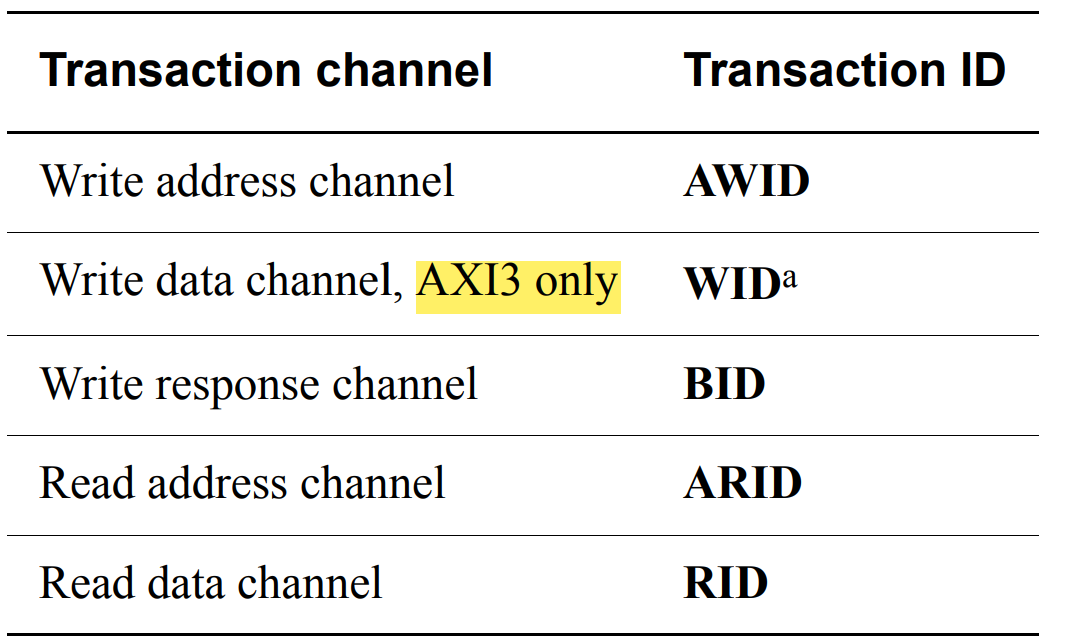
Using IDs allows transactions to be created even if the previous transaction is not finished, which improves system performance, unlike the AHB protocol, which cannot handle outstanding addresses.
Here, it says that WID is only supported in AXI3, but why isn't it supported in AXI4?
Most slaves are unable to process data out of order, so they rarely use the out-of-order feature with WID when doing write transfers. Furthermore, the master has no way to know whether the slave supports the out-of-order feature;;;; That's why there's no need to leave unused signals.
Additional control
Cache support
Controls transaction attributes between memory and peripheral slaves via AxCACHE signals.
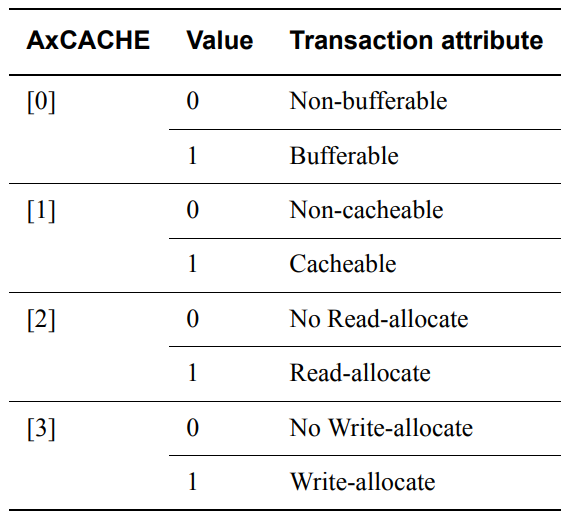
- AxCACHE[0], Bufferable (B) bit
Transactions can be delayed by several clocks before reaching their destination, which is why they are typically used for write transfers.
- AxCACHE[1], Cacheable (C) bit
For write transfers, multiple write transfers can be merged to create a transaction. For read transfers, information at a desired address can be pre-fetched or a single piece of data can be read multiple times.
If this bit is 0, allocate transaction is not possible.
- AxCACHE[2], Read-allocate (RA) bit
Read allocation transfer is used, but not required.
- AxCACHE[3], Write-allocate (WA) bit
Write allocation transfer is used, but not required.
Depending on AxCACHE, Write-back/Write-through and Allocate functions are available.
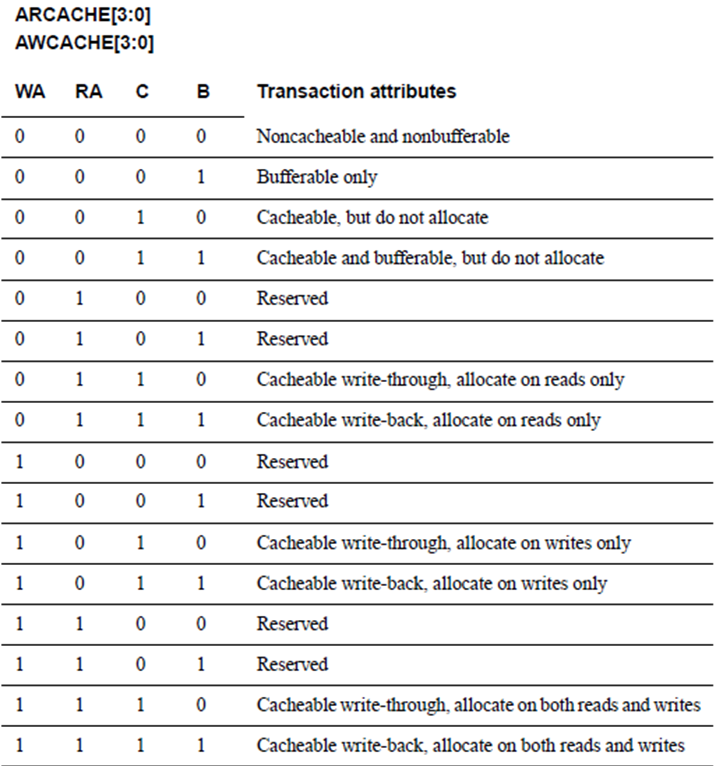
The above features are classified according to the cache hit/miss situation, which is the main performance of the cache.
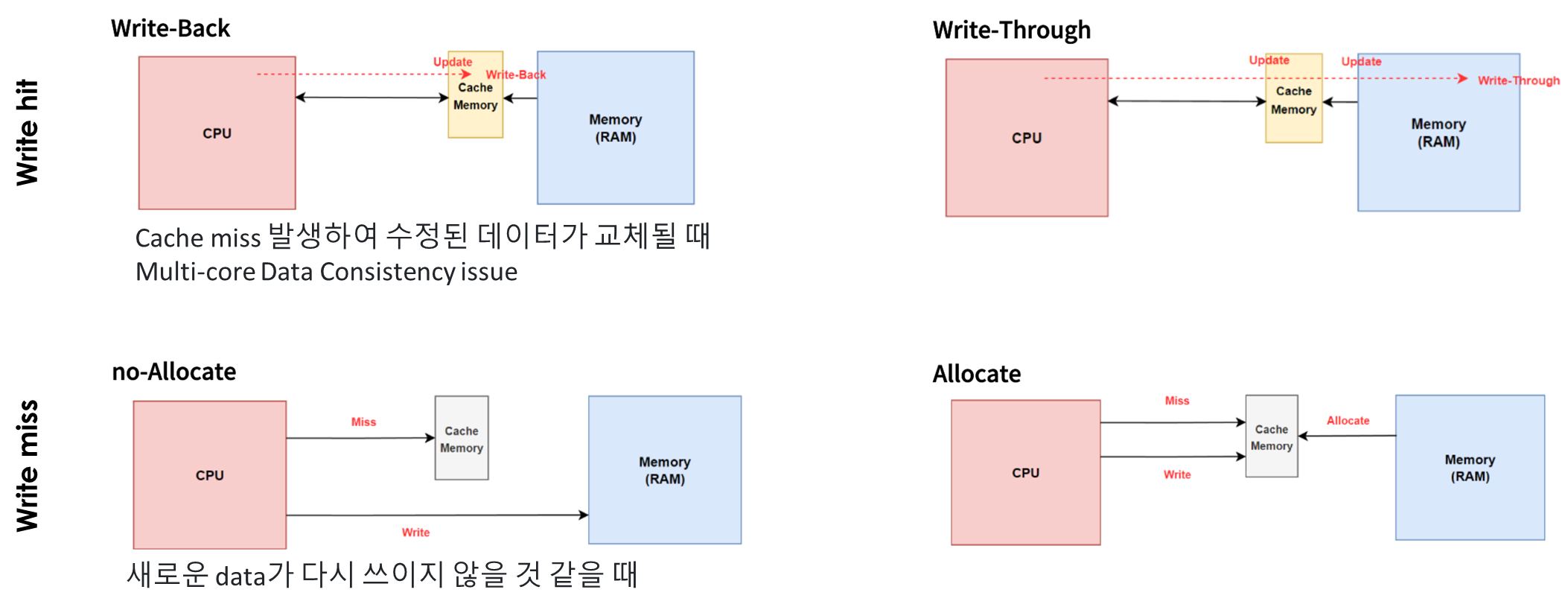
- Write-Back: In the event of a cache write hit, only the data in the cache is updated. Main memory is updated only when a miss occurs and data is replaced. This can lead to data consistency issues.
- Write-Through: In a cache write hit situation, data is modified in both cache and main memory.
- Allocate: In case of a cache write miss, data from main memory is copied to the cache and modifications are made.
- no-Allocate: In the event of a cache write miss, data in main memory is directly modified without being copied to the cache. This is the method used when the data is unlikely to be rewritten.
Protection unit support
Supports protected access via AxPROT signals to prevent illegal transactions in complex systems.
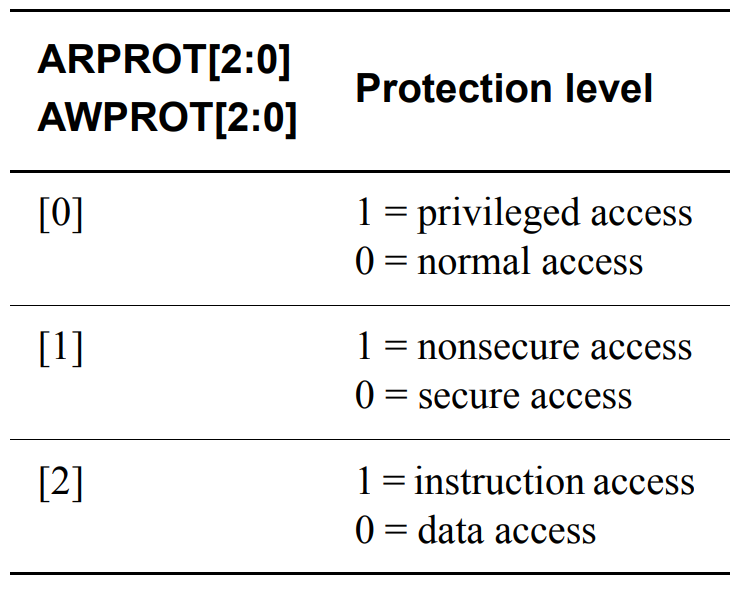
Privileged access: Having higher privileges within the system, which allows certain tasks to access more resources.
Secure access: Safe access to sensitive data
Low-power Interface
The Low-power Interface is an optional extension that allows certain peripherals to enter low-power mode to optimize energy consumption.

Signals
- CACTIVE: Indicates that the peripheral requires a clock.
- CSYSREQ: A request from the clock controller for the peripheral to enter low-power mode.
- CSYSACK: A signal indicating that the peripheral has entered low-power mode.
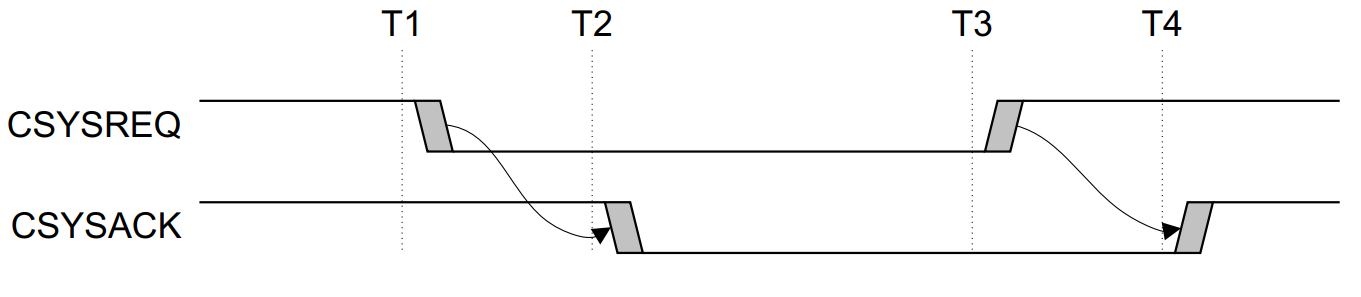
A peripheral may or may not accept the clock controller's request to enter low-power mode.
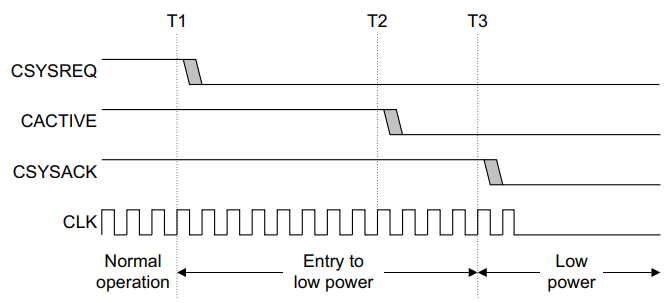
- T1: Request for low-power mode
- T2: Accept low-power mode
- T3: Entry into low-power state completed
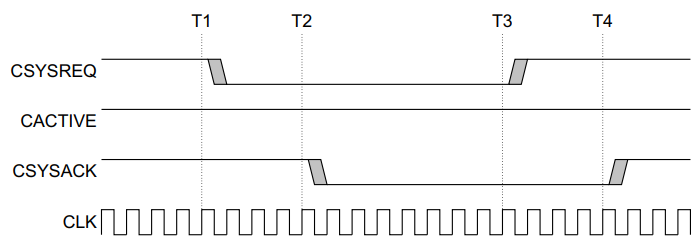
- T1: Request for low-power mode
- T2: Reject low-power mode request (keep CACTIVE HIGH)
- T3: Request to terminate handshake
- T4: Accept handshake termination
Exiting low power mode can be requested by both the peripheral and the clock controller.
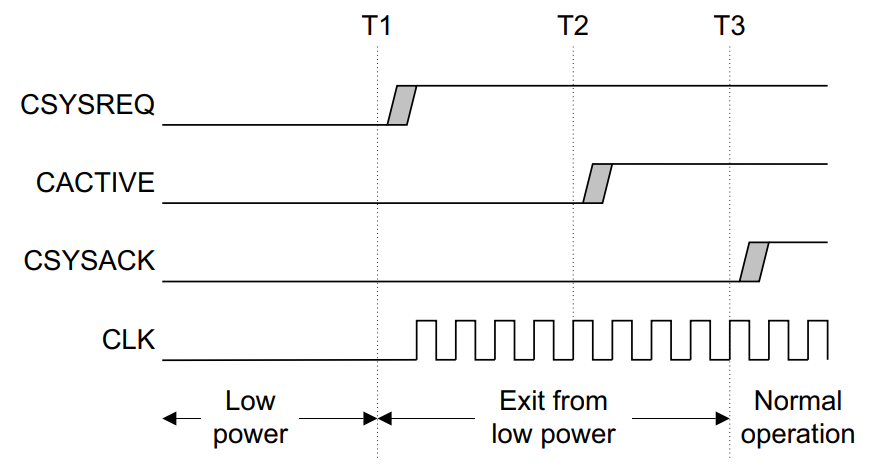
- T1: Clock controller requests exit
- T2: Peripheral accepts exit
- T3: Peripheral notifies exit completion
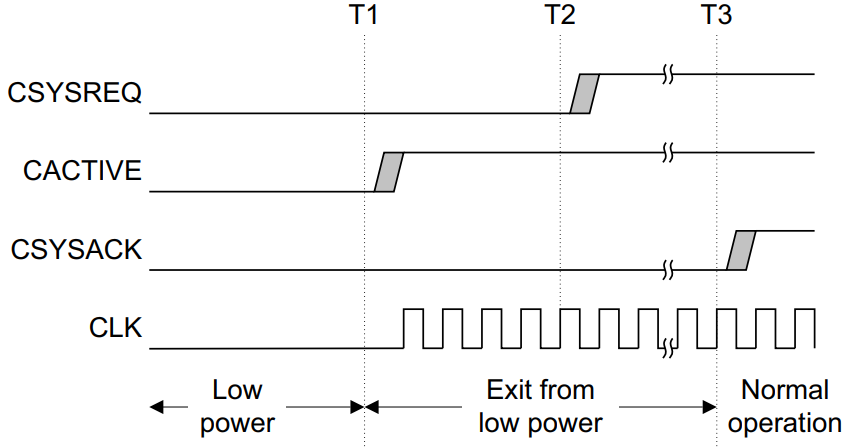
- T1: Peripheral requests exit
- T2: Clock controller exit accept
- T3: Peripheral notifies exit completion
References: ARM® AMBA 5 AXI Protocol Specification


