System Verilog is an extension of Verilog, an HDL(Hardware Description Language)used in semiconductor design to describe the operation of hardware, and is an HDVL (Hardware Design and Verification Language) optimized for verification.
System Verilog Introduction
System verilog VS Verilog
Once a semiconductor design is completed in HDL, it can no longer be updated, necessitating detailed verification. While verification can be accomplished using the existing Verilog, as designs become more complex, a specialized verification environment becomes necessary. System Verilog differs from existing HDLs in the following ways:
- Random stimuli can be generated -> Easy to verify
- OOP (Object Oriented Programming) based, systematic and reusable coding possible
- Concurrency features (ex: fork – join)
- Assertion feature
System Verilog structure
The basic structure of a System Verilog testbench including the DUT (Design Under Test) is as follows.

- Generator: Generates various input stimuli to drive the DUT (provides random variables)
- Driver: Transmits the generated signal to the DUT
- Interface: Defines the connection between the generated signal and the signal to be monitored from the DUT.
- Monitor: Check the signal coming from the DUT
- Scoreboard: Verification by comparing the output of the DUT with the expected results.
- Environment: Contains and instantiates all components mentioned above.
- Test: Configure the test environment by adjusting settings for each test case.
System Verilog data type

logic
The most commonly used data types in Verilog were wire and reg, which used continuous assignment (assign) and procedural assignment (initial and always statements), respectively. System Verilog logic can be used in continuous assignment, procedural assignment, and module port declarations.
module top();

  logic [3:0] data;
  logic       enable;

  initial begin
    $display ("data = 0x%0h, en = %0b", data, enable);
    data = 4'ha;
    $display ("data = 0x%0h, en = %0b", data, enable);
    #10;
    $display ("data = 0x%0h, en = %0b", data, enable);
  end

  assign enable = data[0];

endmodule>> data = 0xx, en = x
>> data = 0xa, en = x
>> data = 0xa, en = 0
bit
Typically, Verilog testbenches don't apply the x (unknown) and z (high impedance) signals to module input ports, so 4-state data isn't needed. Bits are System Verilog's 2-state data, and are primarily used in testbenches. Using bits can optimize simulation time and memory usage.
If x or z is assigned to bit, it is converted to 0.
shortint, int, longint
Integer is an integer type signed data, and can be used as shortint, int, or longint depending on the data size.
module top();

  shortint int_1;
  int      int_2;
  longint  int_3;

  initial begin
    $display("#####################");
    int_1 = 64'hFFFF_FFFF_FFFF_FFFF;
    int_2 = 64'hFFFF_FFFF_FFFF_FFFF;
    int_3 = 64'hFFFF_FFFF_FFFF_FFFF;

    $display("short int = 0x%0h", int_1);
    $display("int       = 0x%0h", int_2);
    $display("long int  = 0x%0h", int_3);
    $display("#####################");
    $display("#####################");

    #10
    int_1 = 16'h7FFF;
    int_2 = 32'h7FFF_FFFF;
    int_3 = 64'h7FFF_FFFF_FFFF_FFFF;

    $display("short int = %0d", int_1);
    $display("int       = %0d", int_2);
    $display("long int  = %0d", int_3);
    $display("#####################");
    $display("#####################");

    #10
    int_1 += 1;
    int_2 += 1;
    int_3 += 1;

    $display("short int = %0d", int_1);
    $display("int       = %0d", int_2);
    $display("long int  = %0d", int_3);
    $display("#####################");
    $display("#####################");
  end

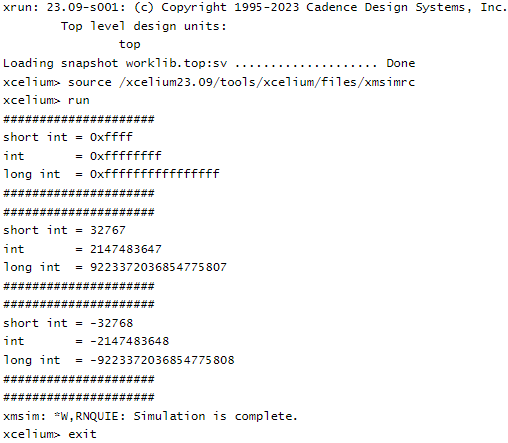
endmoduleThe simulation results are as follows.
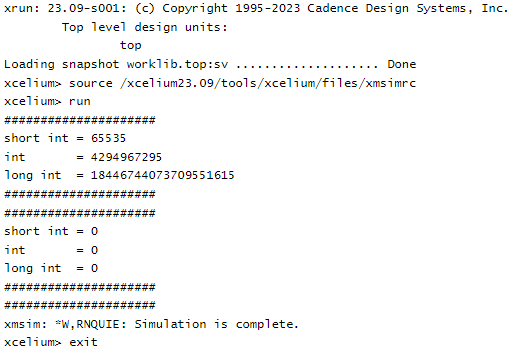
Setting int data to unsigned changes the integer range.
module top();

  shortint unsigned int_1;
  int      unsigned int_2;
  longint  unsigned int_3;

  initial begin
    $display("#####################");
    int_1 = 16'hFFFF;
    int_2 = 32'hFFFF_FFFF;
    int_3 = 64'hFFFF_FFFF_FFFF_FFFF;

    $display("short int = %0d", int_1);
    $display("int       = %0d", int_2);
    $display("long int  = %0d", int_3);
    $display("#####################");
    #10
    $display("#####################");
    int_1 += 1;
    int_2 += 1;
    int_3 += 1;

    $display("short int = %0d", int_1);
    $display("int       = %0d", int_2);
    $display("long int  = %0d", int_3);
    $display("#####################");
    $display("#####################");
  end

endmoduleThe simulation results are as follows.
byte
Byte is used when the data size is shorter than the int type, and like int, it can be set to signed or unsigned.
unsigned byte range: 0 to 255
signed byte range: -128 ~ 127
String
String is a new data type in System Verilog that is an ordered collection of characters.
| Method | Definition | Comments |
|---|---|---|
| str.len() | function int len() | Returns the number of characters in the string |
| str.putc() | function void putc (int i, byte c); | Replaces the ith character in the string with the given character |
| str.getc() | function byte getc (int i); | Returns the ASCII code of the ith character in str |
| str.tolower() | function string tolower(); | Returns a string with characters in str converted to lowercase |
| str.compare(s) | function int compare (string s); | Compares str and s, as in the ANSI C strcmp function |
| str.icompare(s) | function int icompare (string s); | Compares str and s, like the ANSI C strcmp function |
| str.substr (i, j) | function string substr (int i, int j); | Returns a new string that is a substring formed by characters in position i through j of str |
module top();

  string string_1;

  initial begin
    $display("%s", string_1);

    string_1 = "HelloW";
    $display("%s", string_1);

    foreach(string_1[i])
      $display("%s", string_1[i]);

    $display("Length = %0d", string_1.len());
    string_1.putc(0,"O");
    $display("Replace(0,O) = %s", string_1);
    $display("Getting character(5) = %s", string_1.getc(5));
    $display("Lower character = %s", string_1.tolower());
  end

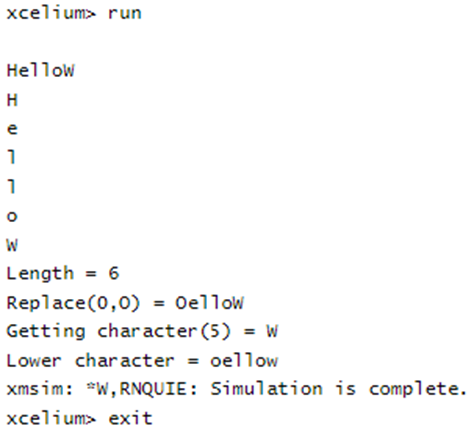
endmoduleLet's just look at the results of a simple example.
Enumeration
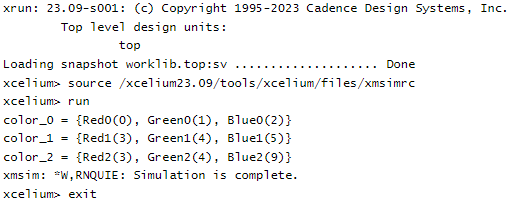
Enumeration (enum) is a data type used to define specific constant values. An enum's name cannot begin with a number. Furthermore, the default type of an enum is int, and the default value of the first variable starts with 0.
Each data in an enum can be assigned a value directly. If not assigned, the value will be increased by 1 from the previous data value. Also, data included in an enum cannot have the same value.
//enum           {Red0, Green0, Blue0} colors_0; //int type
//enum bit [1:0] {Red1, Green1, Blue1} colors_1; //bit type
module top();

  enum bit [1:0] {Red0, Green0, Blue0}         colors_0;
  enum           {Red1 = 3, Green1, Blue1}     colors_1;
  enum           {Red2 = 3, Green2, Blue2 = 9} colors_2;

  initial begin
    $display("color_0 = {Red0(%0d), Green0(%0d), Blue0(%0d)}", Red0, Green0, Blue0);
    $display("color_1 = {Red1(%0d), Green1(%0d), Blue1(%0d)}", Red1, Green1, Blue1);
    $display("color_2 = {Red2(%0d), Green2(%0d), Blue2(%0d)}", Red2, Green2, Blue2);
  end

endmoduleThe simulation results are as follows.
| Method | Definition | Comments |
|---|---|---|
| first() | function enum first(); | Returns the value of the first member of the enumeration |
| last() | function enum last(); | Returns the value of the last member of the enumeration |
| next() | function enum next (int unsigned N = 1); | Returns the Nth next enumeration value starting from the current value of the given variable |
| prev() | function enum prev (int unsigned N = 1); | Returns the Nth previous enumeration value starting from the current value of the given variable |
| num() | function int num(); | Returns the number of elements in the given enumeration |
| name() | function string name(); | Returns the string representation of the given enumeration value |
Array
An array is a collection of data of the same type. In System Verilog, arrays are broadly divided into packed arrays and unpacked arrays, and unpacked arrays are further divided into static arrays, dynamic arrays, associative arrays, and queues.
The distinction between packed and unpacked arrays is determined by whether the array's dimension declaration comes before or after the array name.
  bit [3:0] packed_array; //(= vector)
bit unpacked_array [3:0];Packed array
A packed array is a contiguous set of bits, and you can assign values to each bit individually or all at once.
module top();

  bit [3:0] data;

  initial begin
    data[3] = 1'b0;
    data[2] = 1'b1;
    data[1] = 1'b0;
    data[0] = 1'b1;

    $display("data = %b", data);

    data = 4'hc;

    foreach (data[i]) begin
      $display("data[%0d] = %0b", i, data[i]);
    end
  end

endmodule>> data = 0101
>> data[3] = 1
>> data[2] = 1
>> data[1] = 0
>> data[0] = 0
Additionally, packed arrays can be defined as multi-dimensional.
module top();

  bit [3:0] [7:0] data;

  initial begin
    data[3] = 8'hDE;
    data[2] = 8'hAD;
    data[1] = 8'hCA;
    data[0] = 8'hFE;

    $display("data = 0x%0h", data);
  end

endmodule>> data = 0xdeadcafe
Unpacked array
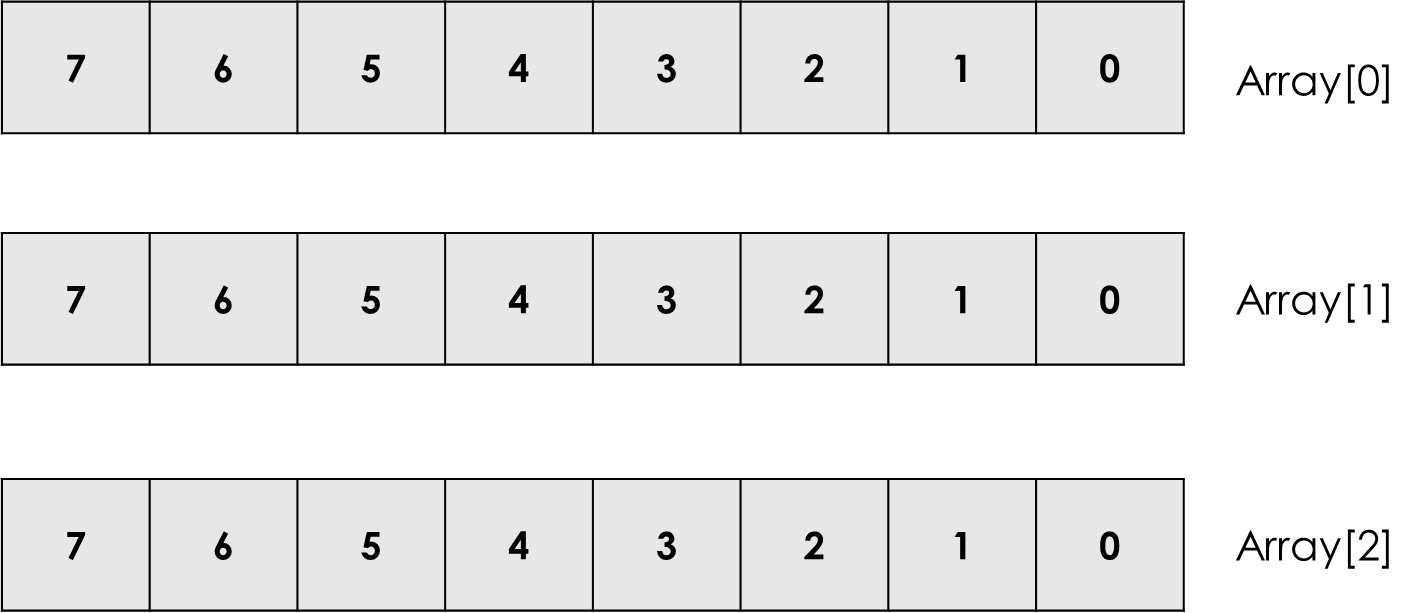
Unpacked array can be defined with any data type and defines size after array_name.
bit [7:0] Array[2:0]Let's check the above array in a picture.
Static array
A static array, also known as a fixed-sized array, is an array whose values for the dimensions following array_name are fixed.
Dynamic array
A dynamic array is an array whose size can be determined or changed during simulation runtime. The default value for size is 0.
//[data_type] [array_name] [];
module top();

  int array [];

  initial begin
    array = new[5];
    array = '{91, 38, 64, 71, 25};

    foreach(array[i]) begin
      $display("array[%0d] = %0d", i, array[i]);
    end
  end

endmodule>> array[0] = 91
>> array[1] = 38
>> array[2] = 64
>> array[3] = 71
>> array[4] = 25
| Function | Description |
|---|---|
| function int size (); | Returns the current size of the array, 0 if array has not been created |
| function void delete (); | Empties the array resulting in a zero-sized array |
Associative array
The dynamic array described above is resizable, with indices starting at 0 and incrementing by 1. If the storage is sparsely populated, this indexing creates unnecessary space, which limits resource usage.
Associative arrays don't define their array size until actual data is entered. Furthermore, they allow for direct, non-numeric indexing, allowing data in the array to be found by key. This slows simulation speed but offers the advantage of improved memory performance.
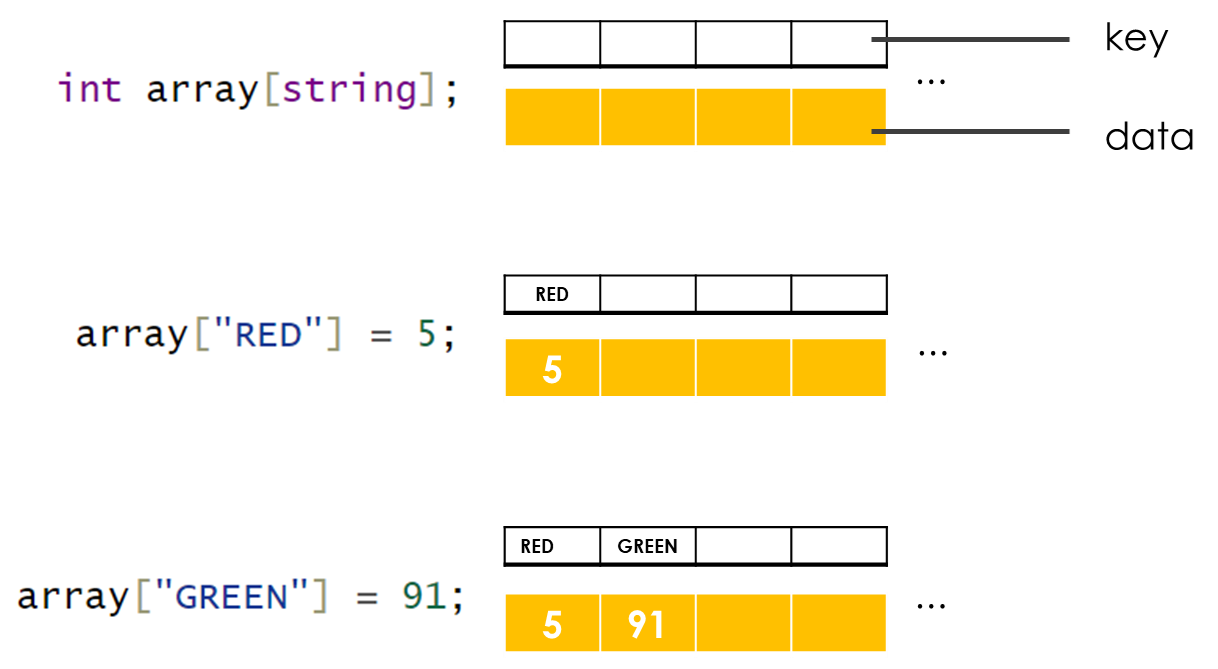
Let's look at an example.
//[data_type] [array_name] [index_type];
module tb();

  int array_1[int];
  bit array_2[string];

  initial begin
    array_1[5] = 10;
    array_1[8] = 20;

    array_2["True"]  = 1;
    array_2["False"] = 0;

    foreach(array_1[i])
      $display("array_1[%0d] = %0d",i,array_1[i]);

    foreach(array_2[i])
      $display("array_2[%s]  = %0d",i,array_2[i]);
  end

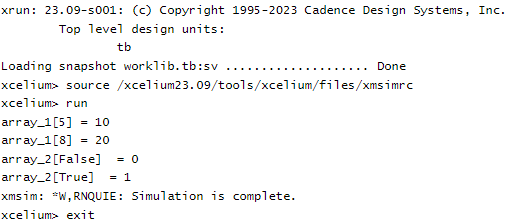
endmoduleThe simulation results are as follows.
| Method | Description |
|---|---|
| num() | returns the number of entries in the associative array |
| delete(index) | removes the entry at the specified index.exa_array.delete(index) |
| exists(index) | returns 1 if an element exists at the specified index else returns 0 |
| first(var) | assigns the value of first index to the variable var |
| last(var) | assigns the value of last index to the variable var |
| next(var) | assigns the value of next index to the variable var |
| prev(var) | assigns the value of previous index to the variable var |
Queue
Queue is a data type that operates in a FIFO (First-In-First-Out) manner, making it easy to insert and delete data from an array in System Verilog.
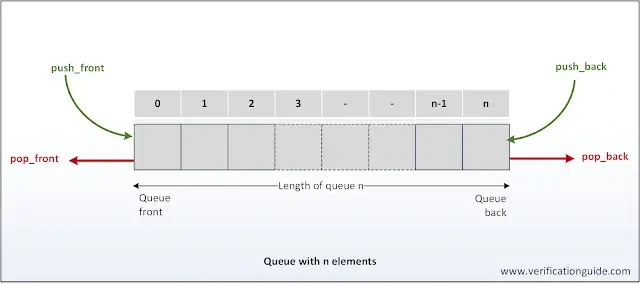
Queues are divided into bounded and unbounded queues, depending on how they're declared. A bounded queue has a depth set when declared, and if more data is input, the oldest data is deleted in a FIFO manner.
//[data_type] [queue_name] [$:N]; Bounded queue
//[data_type] [queue_name] [$]; Unbounded queue
module tb();

  string fruits_1[$];   //Unbounded
  string fruits_2[$:1]; //Bounded

  initial begin
    $display("fruits_1 = %p", fruits_1);
    $display("fruits_2 = %p", fruits_2);
    $display("#######################");

    fruits_1.push_front("apple1");
    fruits_2.push_front("apple2");

    $display("fruits_1 = %p", fruits_1);
    $display("fruits_2 = %p", fruits_2);
    $display("#######################");

    fruits_1.push_front("banana1");
    fruits_2.push_front("banana2");

    $display("fruits_1 = %p", fruits_1);
    $display("fruits_2 = %p", fruits_2);
    $display("#######################");

    fruits_1.push_front("kiwi1");
    fruits_2.push_front("kiwi2");

    $display("fruits_1 = %p", fruits_1);
    $display("fruits_2 = %p", fruits_2);
    $display("#######################");
  end

endmoduleThe simulation results are as follows.
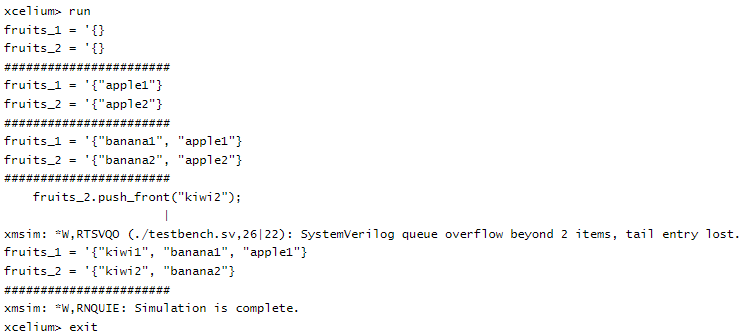
| Method | Description |
|---|---|
| size() | returns the number of items in the queue |
| insert() | inserts the given item at the specified index position |
| delete() | deletes the item at the specified index position |
| push_front() | inserts the given element at the front of the queue |
| push_back() | inserts the given element at the end of the queue |
| pop_front() | removes and returns the first element of the queue |
| pop_back() | removes and returns the last element of the queue |
Structure
Unlike arrays, which are collections of data of the same type, a System Verilog structure is a collection of multiple data types. Structures are unpacked by default unless the user configures them otherwise.
Unpacked structure
//struct {
//  [list of variables]
//} struct_name;

module top();

  struct {
    string fruit;
    int    count;
    byte   expiry;
  } st_fruit;

  initial begin
    st_fruit = '{"apple", 4, 15};

    $display("st_fruit = %p", st_fruit);

    st_fruit.fruit = "pineapple";
    st_fruit.expiry = 7;

    $display("st_fruit = %p", st_fruit);
  end

endmoduleThe simulation results are as follows.
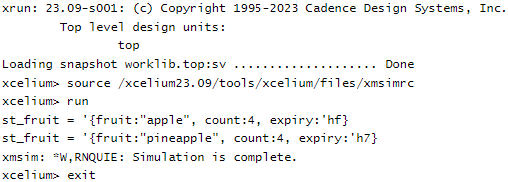
The example above only shows one structure. What if you need multiple structures with the same structure? Should you declare them one by one? You can reduce unnecessary structure declarations by using "typedef struct."
module top();

  typedef struct {
    string fruit;
    int    count;
    byte   expiry;
  } st_fruit;

  initial begin
    st_fruit fruit1 = '{"apple", 4, 15};
    st_fruit fruit2;

    $display("fruit1 = %p, fruit2 = %p", fruit1, fruit2);

    fruit2 = fruit1;
    $display("fruit1 = %p, fruit2 = %p", fruit1, fruit2);

    fruit1.fruit = "pineapple";
    fruit1.expiry = 23;

    $display("fruit1 = %p, fruit2 = %p", fruit1, fruit2);
  end

endmodule'typedef' struct can be declared inside or outside the module.

Packed structure
You can also declare a structure as packed. Since it's called packed, it would naturally be a collection of bits, right?
typedef struct packed {
  bit [7:0] byte_user;
  bit       bit_user;
  bit       en;
} packed_struct_ex;User-defined Data Type
The data types listed above can be supplemented with specific conditions. If the number of data type conditions increases, they can be easily created using typedef.
//typedef data_type type_name
module top();

  typedef shortint unsigned u_shorti;
  typedef enum {RED, YELLOW, GREEN} e_light;
  typedef bit [7:0] ubyte;

  initial begin
    u_shorti data = 16'hCAFE;
    e_light  light = GREEN;
    ubyte    cnt = 8'h5a;

    $display("light = %s, data = 0x%0h, cnt = %0d", light.name(), data, cnt);
  end

endmoduleThe simulation results are as follows.
>> light = GREEN, data = 0xcafe, cnt = 90
References: chip verify
![[Verilog] UART RTL design 2](data:image/svg+xml;base64,PHN2ZyB4bWxucz0iaHR0cDovL3d3dy53My5vcmcvMjAwMC9zdmciIHZpZXdCb3g9IjAgMCA3NjggMTI4OSIgd2lkdGg9Ijc2OCIgaGVpZ2h0PSIxMjg5IiBidi1pbWctdXJsPSJodHRwczovL3J0bGVhcm5lci5jb20vd3AtY29udGVudC91cGxvYWRzL2FsX29wdF9jb250ZW50L0lNQUdFL3J0bGVhcm5lci5jb20vd3AtY29udGVudC91cGxvYWRzLzIwMjQvMDgv6re466a8MS05LTc2OHgxMjg5LmpwZy5idi53ZWJwIiBidi1yZXNpemVkLWluZm9zPSJZblpmY21WemFYcGxaRjl0YjJKcGJHVXVhbkJuT2pRNE1DbzRNRFk3WW5aZmNtVnphWHBsWkY5cGNHRmtMbXB3WnpvM01ETXFNVEU0TUR0aWRsOXlaWE5wZW1Wa1gyUmxjMnQwYjNBdWFuQm5PamMyT0NveE1qZzUiPjwvc3ZnPg==)


