Continuing from the last post, I will explain Verilog grammar.
Instantiation
Instantiation refers to importing a module that has already been completed. When would you instantiate a module?
Testbench
In a previous post, I explained that a testbench is an environment for simulation. The purpose of simulation is to verify or validate the functionality of the DUT (Device Under Test). To do this, we need to bring the DUT into the testbench, right? This is when we instantiate a module.
Architecture design
The figure below is an example of a block diagram of a communication IP called UART.
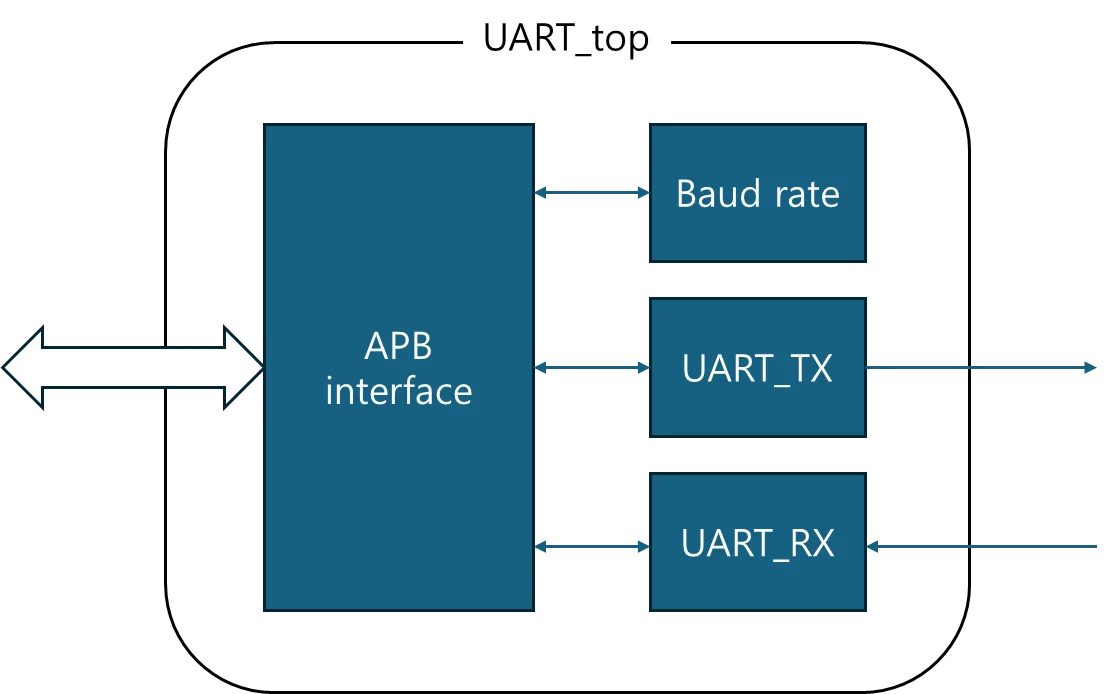
Within the UART module, there are multiple components for each function, right? This structure is called a hierarchy. While it's possible to implement all the components above a single module, this would result in excessively long code and limited reusability. Therefore, we create a module for each component and instantiate the modules above in uart_top to create a structural design.
Now, let's look at an example of instantiation in testbench.
Instantiation example
module top ();

  //Data type declaration, initialization
  reg  [3:0] a; initial a = 4'h0;
  reg  [3:0] b; initial b = 4'h0;

  wire [7:0] c;

  //simulation time
  initial begin
    #500
    $display("////////////////");
    $display("///sim_finish///");
    $display("////////////////");
    $finish;
  end

  //Create a dump file
  initial begin
    $dumpfile("dump.vcd");
    $dumpvars;
  end

endmodule
Here, $display, like $finish, is a Verilog system task that tells the log to display the characters in parentheses. When the above code is executed, the declared regs will display the initial value 4'h0, and since wire is unassigned, it will display z. After 500 ns, the simulation will end.
This time, let's write a multiplier module.
module multiplier (x,y,out);
  input  [3:0] x, y;
  output [7:0] out;

  assign out = x * y;

endmodule
This is a simple module that takes 4-bit x and y as inputs, multiplies them, and outputs an 8-bit output. If input and output are not declared as reg, they are declared as wires.
You can declare the port as follows. When I was at work, I always did it as follows.
module multiplier (
   input  wire [3:0] x
  ,input  wire [3:0] y
  ,output wire [7:0] out
);

  assign out = x * y;

endmodule
Now, let's instantiate this module as a DUT in the testbench. I'll omit the initialization statements that create the simulation time and dump files. You'll need to write your own.
module top ();

  //Data type declaration, initialization
  reg  [3:0] a; initial a = 4'h0;
  reg  [3:0] b; initial b = 4'h0;

  wire [7:0] c;

  //Instantiate dut
  multiplier u_dut (
     .x   (a)
    ,.y   (b)
    ,.out (c)
  );

  //reg control
  initial begin
    #100
    a = 4'h3;
    b = 4'h5;
    #100
    a = 4'h7;
    b = 4'h6;
    #100
    a = 4'h0;
    b = 4'hf;
    #100
    a = 4'hd;
    b = 4'hc;
  end

endmodule
First, let's diagram the above testbench code and analyze it.

If you look at the diagram, it will be easy to understand. Reg a, b declared in the testbench top module are connected to the x, y ports of the multiplexer module instantiated with the name u_dut. And wire c is connected to the out port.
Now, let's run the simulation and see how c changes as a and b change.

I've deleted x, y, and out in the Waveform. Let's review the results above. For reference, all numbers below are in hexadecimal.
#0 : 4’h0 x 4’h0 = 8’h0
#100: 4’h3 x 4’h5 = 8’hf
#200: 4’h7 x 4’h6 = 8’h2a
#300: 4’h0 x 4’hf = 8’h0
#400: 4’hd x 4’hc = 8’h9c
Clock and Reset
Clock and reset are 1-bit signals that play crucial roles in digital circuits. Modules designed in Verilog operate "synchronized" to the clock and are reset to their initial state.
First, let's create a clock and reset in the testbench. Let's run the following code.
module top();
  reg clk;   initial clk   = 1'b0;
  reg reset; initial reset = 1'b1;

  localparam period_clk = 10;

  always #(0.5 * period_clk) clk =  ~clk;

  initial begin
    #period_clk
    reset = 1'b0;

    #100
    $finish;
  end

  initial begin
    $dumpfile("dump.vcd");
    $dumpvars;
  end

endmodule
Then the results of clock and reset will appear as below.

The clock cycle is 10 ns, and you can see that the reset is initially applied (high) and then released (low) 10 ns later. Like this, most testbenches use a method where the reset is applied and then released after a certain period of time and the simulation proceeds.
However, in the previous article, I used "resetn," which means that the reset function, "initialization," operates when the value is low (active-low). In practice, instead of using "reset," which is active-high, we use "resetn," which is active-low. Then, modify the testbench code as follows.
module top();
  reg clk;    initial clk    = 1'b0;
  reg resetn; initial resetn = 1'b0;

  localparam period_clk = 10;

  always #(0.5 * period_clk) clk = ~clk;

  initial begin
    #period_clk
    resetn = 1'b1;

    #100
    $finish;
  end

  initial begin
    $dumpfile("dump.vcd");
    $dumpvars;
  end

endmodule
Flip-Flop and Latch
Both flip-flops and latches are circuits capable of storing information. The difference is that flip-flops operate synchronized to the clock, while latches do not. To put it another way, flip-flops are triggered by clock edges, while latches are triggered by clock levels.
Let's run the code below.
module top();
  reg clk;    initial clk    = 1'b0;
  reg resetn; initial resetn = 1'b0;
  reg D;      initial D      = 1'b0;
  reg Q1;     initial Q1     = 1'b0;
  reg Q2;     initial Q2     = 1'b0;

  localparam period_clk = 10;

  always #(0.5 * period_clk) clk = ~clk;
  always #7 D = ~D;

  initial begin
    #period_clk
    resetn = 1'b1;

    #100
    $finish;
  end

  //Flip-Flop
  always @(posedge clk) begin
    Q1 <= D;
  end

  //Latch
  always @(clk) begin
    Q2 <= D;
  end

  initial begin
    $dumpfile("dump.vcd");
    $dumpvars;
  end

endmodule
The simulation results are as follows.

Can you see the difference? Unlike flip-flops, latches aren't synchronized to clock edges. This is not ideal from a digital design perspective, so they're not usedin practice. However, even if they're synchronized to the clock, latches can still be generated during synthesis. This happens in the following cases:
- When the else condition is not set in the if statement
- When default condition is not set in case statement
Asynchronous Reset Flip-Flop
Finally, let's wrap up with an example of an asynchronous reset flip-flop. The reason we use reset asynchronously is because the reset signal is so important.
For example, if your computer is running and you press the reset button, does the computer come first, or does pressing the reset button come first? If you press the reset button, the computer will reset regardless of how it is running.
Asynchronous Reset means that reset is included in the always statement's sesitive list. Let's look at an example flip-flop using resetn, which is active-low.
  //Asynchronous Reset Flip-Flop
  always @(posedge clk or negedge resetn) begin
    if (!resetn) Q1 <= 1'b0; //Initialize Q1
    else         Q1 <= D;    //How it works after reset
  end
Since the initial value of Q1 is set when reg Q1 is operated like this, there is no need to set the initial value of Q1 with the initial statement.
References: Verilog standard


![[Verilog] 비동기 신호 처리: CDC와 Metastability](data:image/svg+xml;base64,PHN2ZyB4bWxucz0iaHR0cDovL3d3dy53My5vcmcvMjAwMC9zdmciIHZpZXdCb3g9IjAgMCA3MjcgMzIyIiB3aWR0aD0iNzI3IiBoZWlnaHQ9IjMyMiIgYnYtaW1nLXVybD0iaHR0cHM6Ly9ydGxlYXJuZXIuY29tL3dwLWNvbnRlbnQvdXBsb2Fkcy9hbF9vcHRfY29udGVudC9JTUFHRS9ydGxlYXJuZXIuY29tL3dwLWNvbnRlbnQvdXBsb2Fkcy8yMDI1LzEyL2ltZy5qcGcuYnYud2VicCIgYnYtcmVzaXplZC1pbmZvcz0iTkRnd0xtcHdaem8wT0RBcU1qRXpPemd5TUM1cWNHYzZOekkzS2pNeU1qc3hOVE0yTG1wd1p6bzNNamNxTXpJeSI+PC9zdmc+)