
In this article, we'll explore the basic syntax of Verilog. The first thing to remember is that each statement must end with a semicolon (;).
Verilog basic configuration
module module_name (port_list);

  //Declare
  reg reg_name;
  wire wire_name;
  parameter parameter_name;

  //Circuit description part
  Instantiation
  always statements
  initial statements
  function, task definition
  assign statements

endmodule
Looking above, you can see the basic structure of writing Verilog. Let's take a look at them one by one.
Module declaration
Module: This is the basic design unit. It's written as module – endmodule . While a single file can contain multiple modules, we recommend creating only one.
port_list: Defines the input and output ports for the circuit. If there are no input or output ports, this can be left blank. ()
Data type, constant declaration
Verilog's data types are broadly divided into two types: Net and register.
Net
A net is a simple physical connection between hardware, and is therefore used for contiguous assignments (assign statements). Types of nets include wire, wand, and wor, but I've never encountered any other net in practice, so I'll just use wire.
Register
It is used for procedural assignment (=, <=)as a variable data type. There are types of registers such as reg, integer, and real, but reg is mainly used.
reg: Can model storage elements such as flip-flops or latches.
Finally, you can declare constants via parameters.
Initial value of data type
Reg assigns values through procedural assignment within initial or always statements, while wire assigns values through continuous assignment. What happens if a value isn't assigned?
reg: The initial value of reg is x (unknown).
wire: The initial value of wire is z (high impedance). You can think of it as a circuit with an open switch.
Circuit description
The actual circuit's function, operation, and timing are described. Circuit structure can be described through instantiation, and circuit operation is described through statements such as initial and always statements.
Here, instantiation means importing an already completed module as a submodule.
There are two main types of syntax used in circuit descriptions, categorized by whether they are used for logic synthesis or not. Syntax that can be synthesized is used for hardware design, while syntax that cannot be synthesized is used for simulation.
| Logical synthesis | Simulation |
|---|---|
| assign if ~ else case always | Circuit description of the testbench System task ($display, $finish ...) |
One final thing to note is that you must use only declared data types and constants. Otherwise, a syntax error will occur.
Commemts
Comments are marked with // and extend to the end of the line. If you want to comment out a section, use /* ~ */.
reg a; //Comment out from here on out
reg b;

//Only wire f is declared
wire /*c;
wire d;
wire e;
wire */ f;
Procedure assignment
initial statements
The initial statement is primarily used for simulation in the testbench (which can be considered a simulation environment) and is not used for logic circuit synthesis. The initial statement contains procedural assignments, which require reg value assignments. Note that the initial statement is a testbench statement, meaning it is not implemented as a circuit during actual synthesis.
Procedural assignments written within an initial statement are simulated according to the order of the statements. Let's understand what this means through an example.
Writing a testbench
module top ();

  //reg declare
  reg a;

  //1. reg control
  initial begin
    a = 1;
    #100
    a = 0;
    #100
    a = 1;
  end

  //2. Simulation time
  initial begin
    #1000
    $finish;
  end

  //3. dump file
  initial begin
    $dumpfile("dump.vcd");
    $dumpvars;
  end

endmodule
The initial statement specifies the behavior after the simulation starts.There are three main initial statements, each of which will be explained below.
reg control
Assigns a value to reg a previously declared.
#: Indicates a delay. When the simulation starts, the value of a is 1, and after 100 time passes, a changes to 0, and then after 100 time passes again, it changes to 1. In Verilog, the timescale is mostly in nanoseconds (ns), so you can see that 100ns, 100ns have passed. This is also a syntax that is not synthesized into an actual circuit, just like the initial syntax.
=: The = in an initial or always statement indicates a procedural assignmentand assigns to reg. Procedural assignments include non-blocking assignments (<=)and blocking assignments (=), with = being a blocking assignment. The difference between the two will be explained later.
If there are two or more lines in the initial syntax, you must write begin ~ end, but if there is only one line, you can omit begin ~ end.
Additionally, each initial statement is executed in parallel after the simulation begins, so the order does not matter. Only the order within an initial statement matters.
  initial begin
    a = 1;
    #100
    a = 0;
    #100
    a = 1;
  end

///////////////////
////위 아래 같음////
///////////////////

  initial      a = 1;
  initial #100 a = 0;
  initial #200 a = 1;

///////////////////
////위 아래 같음////
///////////////////

  initial #100 a = 0;
  initial      a = 1;
initial #200 a = 1;Simulation time
$finish: $ is a Verilog system task. Among them, $finish indicates the end of the simulation. In other words, this initial statement means that the simulation will end 1000ns after starting.
Create a dump file
To display a waveform, you need to create a dump file. This means creating a dump file to check the waveform results.
always statements
The always statement, like the initial statement, is used to assign values to reg. Let's run the following example.
module top();

  parameter period_clk = 10;

  reg  clk;    initial clk = 1'b0;
  reg  resetn; initial resetn = 1'b0;

  always #(period_clk*0.5) clk = ~clk;

  initial begin
    #(period_clk);
    resetn = 1'b1;
  end

  initial begin
    #500
    $display("//////////////");
    $display("//sim_finish//");
    $display("//////////////");
    $finish;
  end

  initial begin
    $dumpfile ("dump.vcd");
    $dumpvars();
  end

endmoduleThe results are as follows:
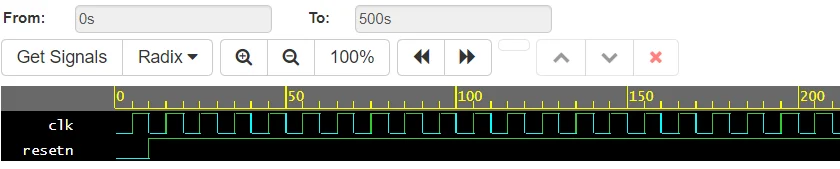
After clk and resetn are declared, the following commands are always executed.
#(period_clk*0.5) clk = ~clk;
The above always statement expression is only used in testbenches, and the standard for always statements is as follows.
always @(sensitive_list) begin
  //blocking or non-blocking 할당
endHere, @ indicates that the event is detected. If a change is detected in the user-defined sensitive_list, the procedure assignment within the always statement will be executed. Let's understand this by looking at the example below.
//testbench
module top ();

  //Data type declaration, initialization
  reg  [3:0] a; initial a = 4'h0;
  reg  [3:0] b; initial b = 4'h0;

  wire [7:0] c;

  //Instantiate dut
  multiplier u_dut (
     .x   (a)
    ,.y   (b)
    ,.out (c)
  );

  //reg control
  initial begin
    #100
    a = 4'h3;
    b = 4'h5;
    #100
    a = 4'h7;
    b = 4'h6;
    #100
    a = 4'h0;
    b = 4'hf;
    #100
    a = 4'hd;
    b = 4'hc;
  end

  //simulation time
  initial begin
    #500
    $display("////////////////");
    $display("///sim_finish///");
    $display("////////////////");
    $finish;
  end

  //Create a dump file
  initial begin
    $dumpfile("dump.vcd");
    $dumpvars;
  end

endmodule

//DUT module
module multiplier (
   input  wire [3:0] x
  ,input  wire [3:0] y
  ,output reg  [7:0] out
);

  always @(x or y) begin
    out = x * y;
  end

endmodule
The multiplier in the code above is a variation of the module from the previous article. Instead of assigning, it uses the always statement to assign a value to out. Note that because we're using the always statement, not assign , the out port must be declared as reg.
Let's examine the always statement within the multiplier module. The sensitive_list contains either x or y, and the always statement executes whenever a change in either x or y is detected. In conclusion, we can achieve the same result as the multiplier statement in the previous article.
The multiplier module can also be expressed as follows:
module multiplier (
   input  wire [3:0] x
  ,input  wire [3:0] y
  ,output reg  [7:0] out
);

  always @(x or y) begin
    out = x * y;
  end

endmodule
////////////////////////////
////////////////////////////
////////////////////////////
module multiplier (
   input  wire [3:0] x
  ,input  wire [3:0] y
  ,output wire [7:0] out
);

  reg [7:0] result;
  always @(x or y) begin
    result = x * y;
  end

  assign out = result;

endmodule
////////////////////////////
////////////////////////////
////////////////////////////
module multiplier (
   input  wire [3:0] x
  ,input  wire [3:0] y
  ,output wire [7:0] out
);

  reg [7:0] result;
  always @(*) begin
    result = x * y;
  end

  assign out = result;

endmoduleThe second expression declares the output port as a wire and assigns it. It's a simple variation, but when I was working, most IPs also declared the output port as a wire.
The third expression uses * instead of x or y in the sensitive_list. * means that the sensitive_list includes all inputs, i.e. both x and y.
Contiguous assignment
Indicates a consecutive assignment that is not included in an initial or always statement and is assigned to a wire.
//Continuous assignment format
assign wire_name = logic;
Now, let's modify the testbench as follows:
module top ();

  //Data type declaration
  reg  [7:0] a;
  wire [7:0] b;

  Contiguous assignment
  assign b = a;

  //1. reg control
  initial begin
    a = 8'b1;
    #100
    a = 8'b0;
    #100
    a = 8'b1;
  end

  //2. Simulation time
  initial begin
    #1000
    $finish;
  end

  //3. dump file
  initial begin
    $dumpfile("dump.vcd");
    $dumpvars;
  end

endmodule
Here, reg [7:0] and wire [7:0] mean that the bit-width of the reg and wire is 8 bits from 0 to 7. That's why, when assigning the value of reg a in the first initial statement, it was expressed as 8'b1, 8'b0.
8′: means 8 bits.
b: stands for base. b stands for binary, o stands for octal, d stands for decimal, and h stands for hexadecimal.
Then, shall we check the simulation results of the testbench above?

You can see that the value of reg a is correctly assigned to wire b. Let's look at another example.
module top ();

  //Data type declaration
  reg  [7:0] a;
  reg  [7:0] a_1;
  wire [7:0] b;

  Contiguous assignment
  assign b = (a | a_1);

  //1. reg control
  initial begin
    a = 8'h1;
    #100
    a = 8'h2;
    #100
    a = 8'h3;
  end

  initial begin
    a_1 = 8'h40;
    #100
    a_1 = 8'h50;
    #100
    a_1 = 8'h60;
  end

  //2. Simulation time
  initial begin
    #1000
    $finish;
  end

  //3. dump file
  initial begin
    $dumpfile("dump.vcd");
    $dumpvars;
  end

endmodule
You can also put logic in assign (continuous assignment) as above.

For reference, the order of assign statements doesn't matter as long as the wires are declared in advance. However, you should organize them well for code reuse, right?
References: Verilog standard


