In this article, we will introduce an overview of Verilog, one of the HDLs, and its simulation methods.
What is HDL (Hardware Description Language)?
HDL is a hardware description language used to design and verify digital systems, from basic components to actual semiconductor chips, and can describe the functions and timing of circuits.
It should be noted that it is different from general computing languages because it is a hardware design language, not a software design language..
Why Use HDL?
So why are semiconductors designed using HDL rather than blueprints?

Here's an example circuit diagram. You can see various components and gates. Today's chips are significantly more powerful than their predecessors. As a result, they typically contain hundreds of millions of transistors. Drawing them all individually would be impossible, right?
It is said that in the past, logic gates were designed by drawing them one by one, but after the advent of EDA (Electronic design automation) tools that synthesize HDL , semiconductor designs are done through HDL.
Setting up the Verilog simulation environment
EDA playground
Verilog is one of the HDLs, just like VHDL. I know that VHDL is used in universities and research institutes, while Verilog is widely used in industry.
Simulation and synthesis are performed using the EDA tools mentioned above. However, most of these tools are paid, so I'd like to introduce you to an EDA playground, a free online simulation platform.

First, click "Log in" in the upper right corner to log in. Then, configure the Tools & Simulators settings in the middle left corner as shown below.

Icarus Verilog is a free simulation tool. Checking "Open EPWave after run" allows you to view the waveform after the simulation is complete.
Then, let's write the following in testbench.sv. You don't need to write design.sv.
module top ();

  initial begin
    #1000
    $finish;
  end

endmodule
I'll explain what the above code means later. Clicking "Run" at the top will start the simulation.

Then, the following error code will appear in the Log below.
No *.vcd file found. EPWave will not open. Did you use ‘$dumpfile(“dump.vcd”); $dumpvars;’?
This means that the dump file was not created. To view the waveform, you need to create a dump file. Let's modify the code as follows.
module top ();

  //simulation time
  initial begin
    #1000
    $finish;
  end

  //Create a dump file
  initial begin
    $dumpfile("dump.vcd");
    $dumpvars;
  end

endmodule
And if you press run again, a waveform window like the one below will appear.

Since we haven't declared anything yet, there's no information in the waveform. So, let's finally modify the code as follows and start the simulation.
module top ();

  //reg declare
  reg a;

  //reg control
  initial begin
    a = 1;
    #100
    a = 0;
    #100
    a = 1;
  end

  //simulation time
  initial begin
    #1000
    $finish;
  end

  //Create a dump file
  initial begin
    $dumpfile("dump.vcd");
    $dumpvars;
  end

endmodule
You can see that the reg called a changes from 1 -> 0 -> 1. I will explain the above code later.
I tried to run a simulation using Verilog in EDA playground.
Icarus verilog & gtkwave
EDA Playground is certainly a great site, but it requires an internet connection and a login to use. Furthermore, one drawback is that waveform results cannot be viewed when simulation times are long.
To solve this problem, you can simulate it using a tool called Icarus Verilog on Windows. For instructions on installing Icarus Verilog and GTKwave, please refer to this article.
I saved the top module above as a file named top.v. You can open a command prompt by pressing the Windows key + R and entering "cmd." Then, use the "cd" command to navigate to the folder where you saved top.v.
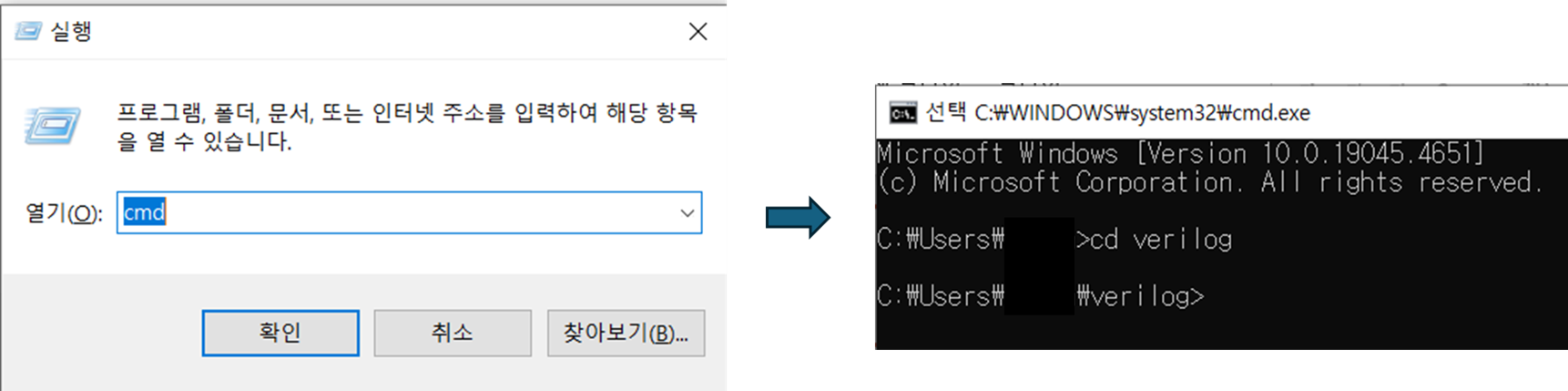
After that, just enter the command below.
- Compile test.vvp top.v (test.vvp file created)
- Running the simulation: vvp test.vvp (this will create the dump.vcd file that was created in top.v)
- Open waveform: gtkwave dump.vcd (check the waveform window with the generated dump.vcd file)
Compile
Enter the file name to be created during compilation (test.vvp) and the file used for compilation (top.v). After compilation, you can see that the test.vvp file has been created in the file list.
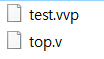
However, as you design, the number of files used for compilation will increase. If the compilation list is top.v module_1.v module_2.v, the compilation command is
iverilog -o test.vvp top.v module_1.v module_2.v
It will be. It's too annoying;;;;; So, you can make a list file and simplify the command. If the list file is called test.f
//test.f
top.v
module_1.v
module_2.v
Enter it like this and save it. Then, you can get the same compilation result by entering the command like this.
iverilog -o test.vvp -c test.f
So, if you just modify test.f (list file), you can compile with the same command.
Running the Simulation
When the actual simulation is run, the dump file set in the initial statement of top.v is created.
  //Create a dump file
  initial begin
    $dumpfile("dump.vcd");
    $dumpvars;
  end
Check the waveform
Finally, enter the command to open the waveform to view the simulation results. Once the process is complete, delete the dump files (.vcd and .vvp).
Please note that you must check the file names you enter in the command!!!
Makefile
When using the Icarus tool, there are separate commands for compiling, running simulations, and checking waveforms. However, memorizing them all individually can be tedious. Using a Makefile can simplify these commands.
This feature automates repetitive commands for files. While originally designed for Linux, it can also be used in Windows environments by installing GNU Make. For installation instructions, see this article.
Then, create a file called Makefile in the directory where the top.v and test.f files were and enter the code below.
run:
	iverilog -o test.vvp -c test.f

dump:
	vvp test.vvp

wave:
	gtkwave dump.vcd
#----------------------------------------------------------------------------------------------------
# Rule to clean temp files
#----------------------------------------------------------------------------------------------------
clean:
	del *.vcd *.vvp
This means that the compile, simulation run, and waveform check commands explained above are converted to the commands run, dump, and wave, respectively. "clean" means to delete (del) all .vcd and .vvp files. Note that commands like run, dump, wave, and clean can be customized by the user.
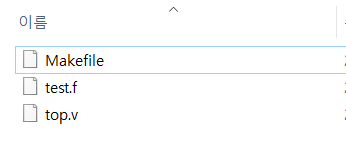
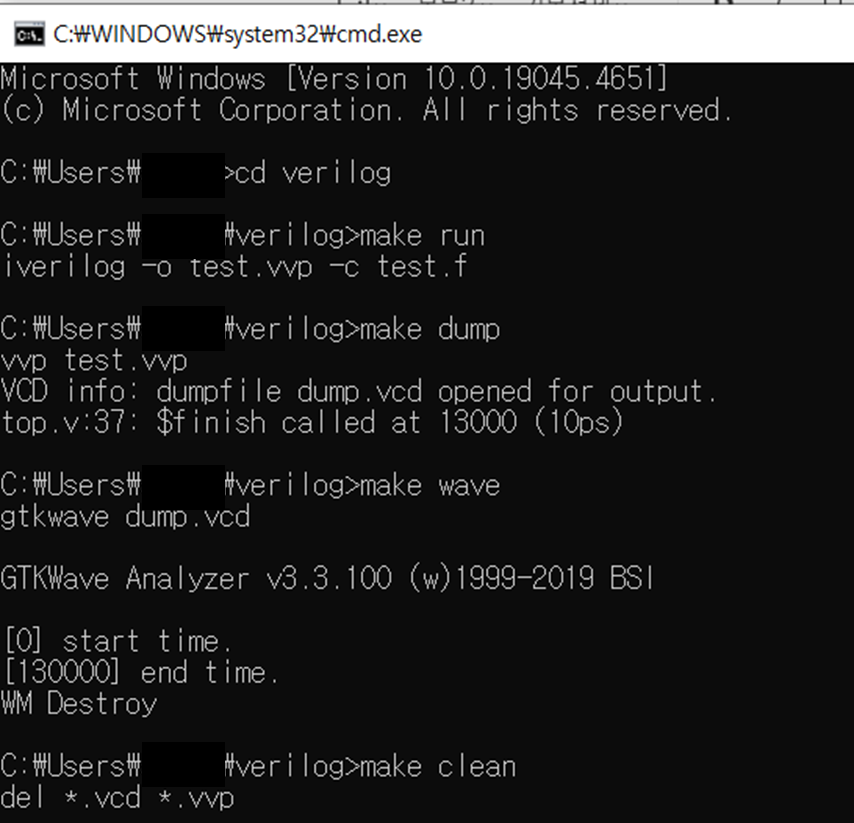
If you set it up as above, the command to enter in the cmd window is as follows.
- Compile: make run
- Running the simulation: make dump
- waveform check: make wave
- Delete the dump files: make clean

![[Verilog] 비동기 신호 처리: CDC와 Metastability](data:image/svg+xml;base64,PHN2ZyB4bWxucz0iaHR0cDovL3d3dy53My5vcmcvMjAwMC9zdmciIHZpZXdCb3g9IjAgMCA3MjcgMzIyIiB3aWR0aD0iNzI3IiBoZWlnaHQ9IjMyMiIgYnYtaW1nLXVybD0iaHR0cHM6Ly9ydGxlYXJuZXIuY29tL3dwLWNvbnRlbnQvdXBsb2Fkcy9hbF9vcHRfY29udGVudC9JTUFHRS9ydGxlYXJuZXIuY29tL3dwLWNvbnRlbnQvdXBsb2Fkcy8yMDI1LzEyL2ltZy5qcGcuYnYud2VicCIgYnYtcmVzaXplZC1pbmZvcz0iTkRnd0xtcHdaem8wT0RBcU1qRXpPemd5TUM1cWNHYzZOekkzS2pNeU1qc3hOVE0yTG1wd1p6bzNNamNxTXpJeSI+PC9zdmc+)


