After months of work on the LIN controller IP RTL design, I'm now working on a checklist for verification. I'll try to summarize it in this post. If you have any suggestions for revisions, please email me!
Verification on testbench
Register Read/Write
The IP is controlled by setting internal registers. These registers are read/written via bus access. I designed the interface based on the APB bus.
Check if the default values of Register are read correctly
Whether the values are written and read properly in the register
You need to check. This is the most basic testcase that every IP must go through.
Data transfer
Next, I need to verify that data transmission and reception are working properly. I connected two controllers using a Bus Functional Model (BFM) and conducted a test.
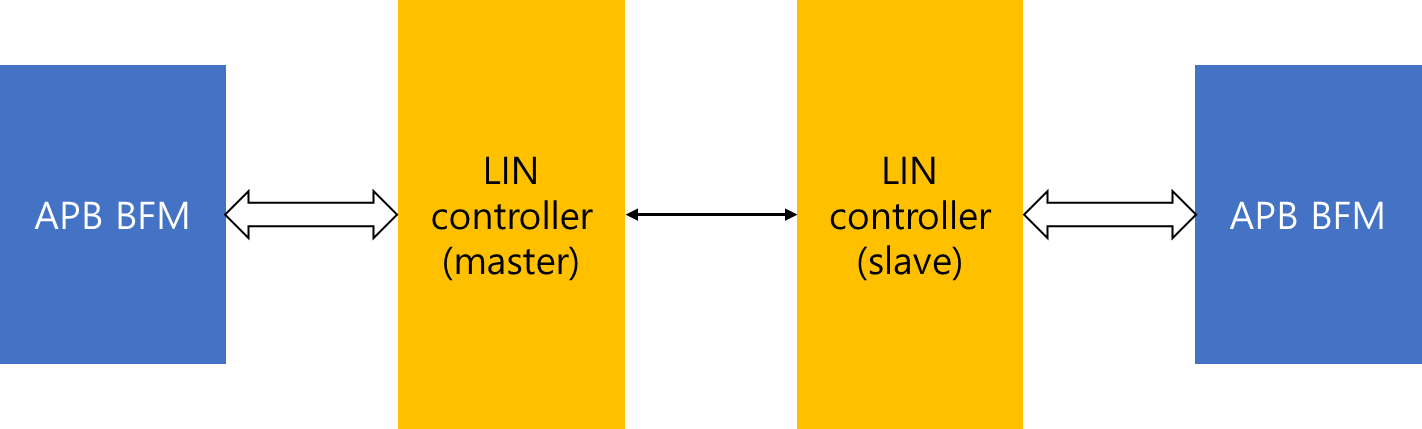
I'll explain what BFM is later. Simply put, you can think of it as the core that controls the module. I verified that the Master TX and Master RX are functioning properly.
Sleep, wakeup
This controller has sleep and wakeup functions that other IPs don't have, and I've verified that these functions work properly.
Error case
Finally, I created a case where an error occurred artificially to verify that the LIN controller could detect the anomaly. The error case I created is as follows:
Master/Slave mode
- Bit error
- Checksum error
- Timeout error
Slave mode only
- Break error
- Sync error
- Parity error
Well then, shall we take a closer look at each one?
Bit error
The byte field of this protocol is 10 bits in total: 1 start bit + 8 data bits + 1 stop bit (excluding the break field).
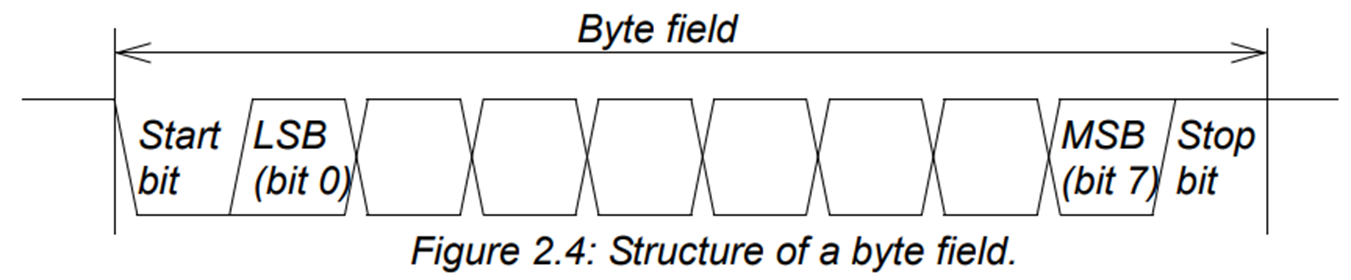
The start bit is always low, and the stop bit is always high, so if this isn't the case, an error occurs. We artificially create an error by setting the start bit high or the stop bit low, and test whether the controller detects this.
Checksum error
Both Master tx/rx perform a checksum check at the end. If the checksum calculation result is incorrect, a checksum error occurs.
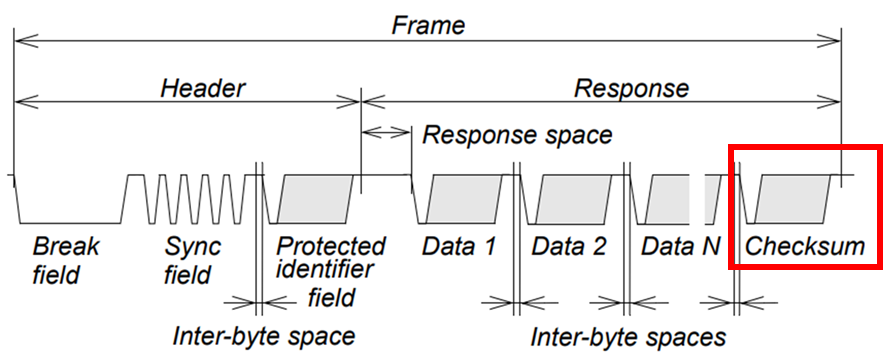
Try artificially inputting different checksum values to see if the controller detects them (Enhanced checksum, classical checksum).
Timeout error
Each byte field has something called inter-byte space. I looked through the spec, but it wasn't clearly defined. So, when I was designing the LIN controller, the condition for transitioning from the stop bit of the previous byte field to the start bit of the next byte field was when the LIN bus went from high to low. (I don't know the inter-byte space time between byte fields.)
However, if for some reason there is no signal coming from the bus, the LIN slave module will malfunction. This should never happen.Therefore, if there is no signal coming in for a certain period of time during communication, a timeout error is detected and an interrupt is generated so that the module can be initialized.
Break error (slave only)
As mentioned earlier, excluding the break field, the LIN slave will receive a high signal for at least 10 bits due to the stop bit. Only in the break field will it receive a low signal for more than 13 bits.

But what happens if the slave recognizes the break field and receives a high signal within 13 bits? This could indicate either that the slave's communication speed doesn't match the master's,or that the slave intervened in the communication for some reason.(Since it's hardware, there could be external factors like shock, right?)
Whether it's the first or second situation, there's a problem, so we designed the slave controller to detect the error.
Sync error (slave only)
In the Sync field, the slave always receives a value of 0x55. If the value does not match, an error occurs because the communication speed between the master and slave does not match.

Parity error (slave only)
As a final error case, we designed the PID to detect parity errors.
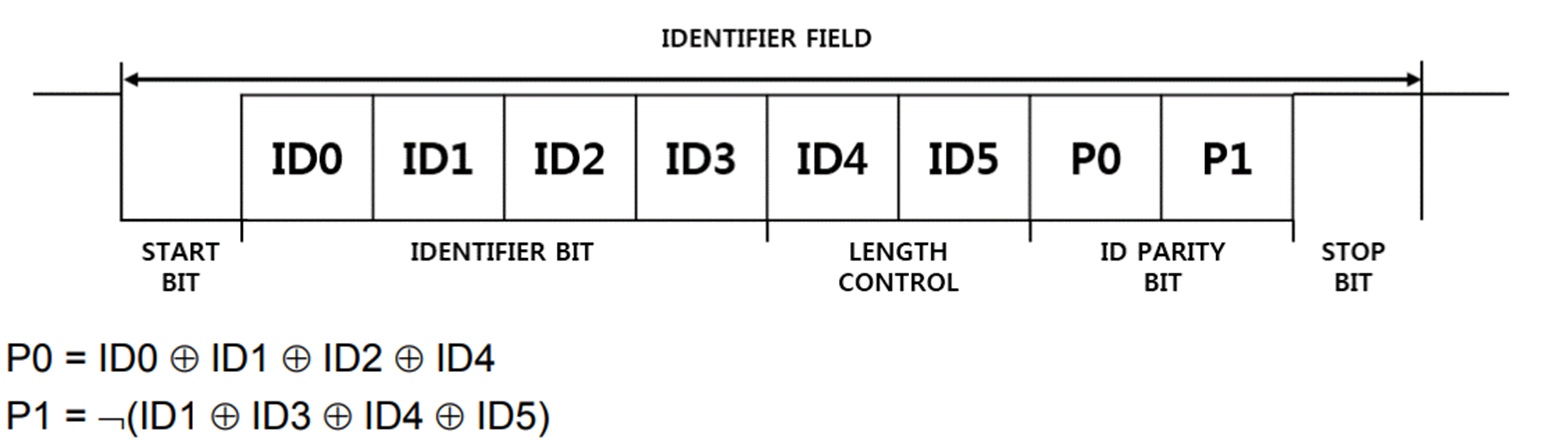
The slave controller calculates parity using the PID value received from the master controller. If the calculated parity differs from the received parity, an error occurs.
FPGA test
We mounted the designed controller on SoC (2 channels), performed FPGA synthesis, and conducted data communication tests.
Test without LIN transceiver
First, we tested by connecting the IO pins on the FPGA board without a transceiver. While this is a 1-wire communication, the transceiver we purchased has TX/RX pins on the board, so we designed an output enable and assigned it to the board pins.
So, if we represent the test environment in a diagram, it would look like this:
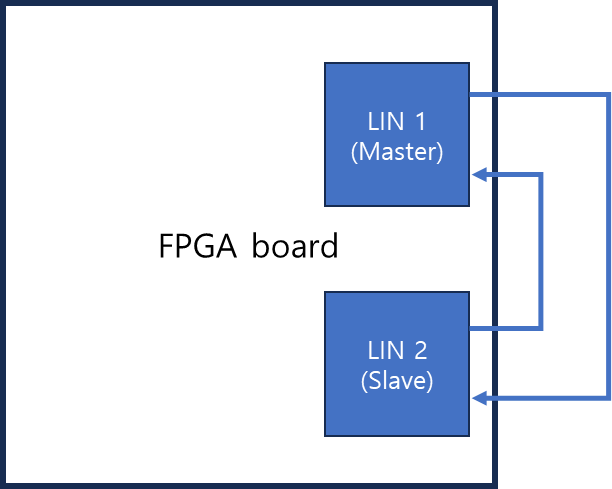
Of course I passed this test, but the next part was the problem;;
Test with LIN transceiver
In actual communication, a transceiver is connected. The transceiver converts the digital signal from the FPGA into an analog signal. It also converts the board output voltage (1.8V or 3.3V) to the actual communication voltage of 9-18V. We used MIKROE's LIN CLICKproduct.
First, here is a picture of the test environment:
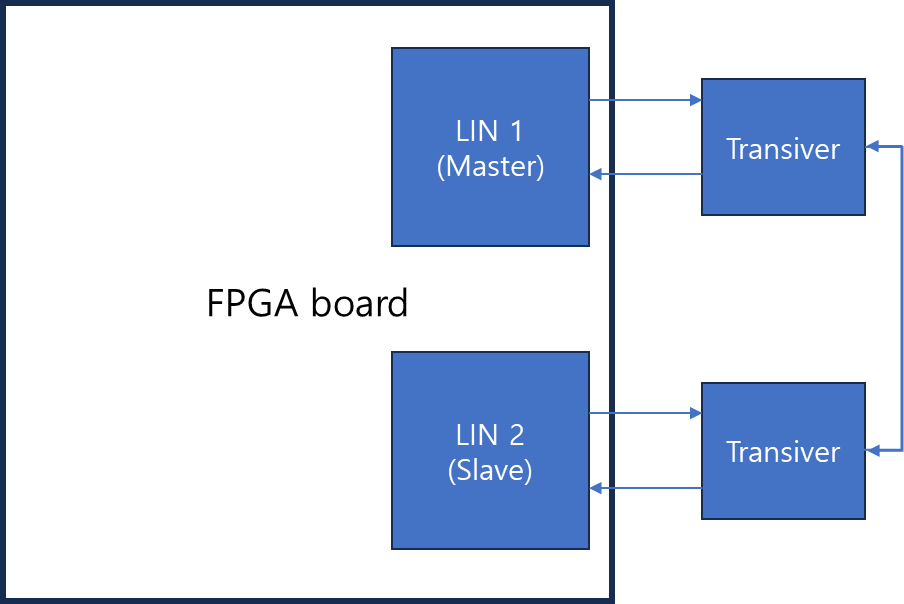
Let me explain while looking at the actual transceiver.
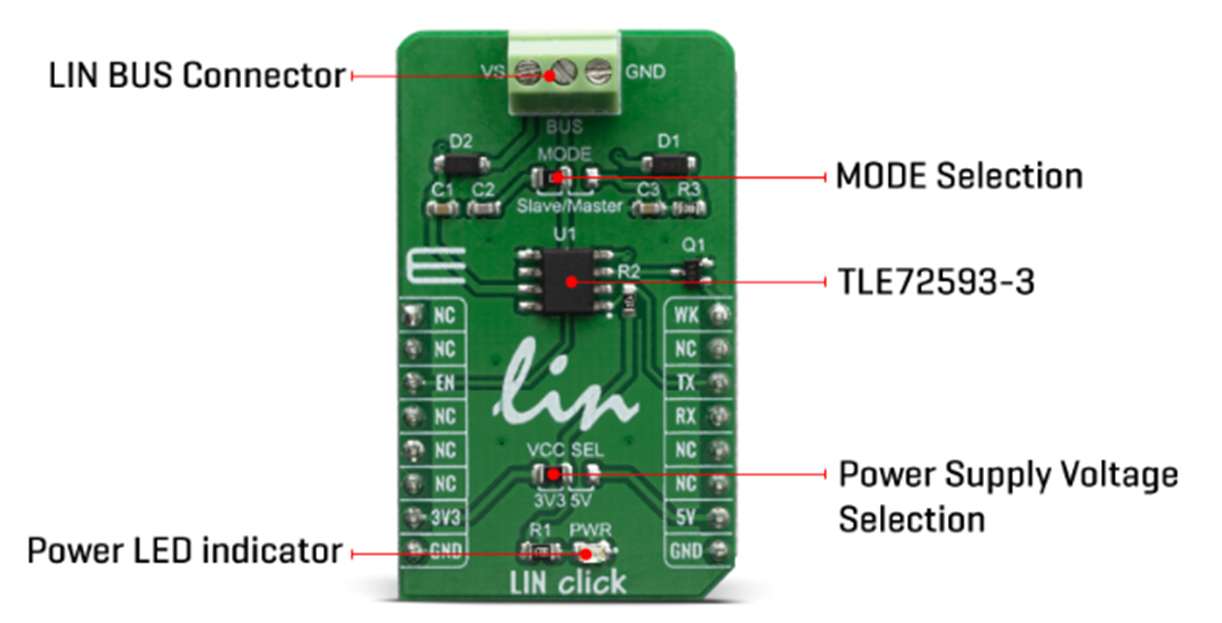
This transceiver doesn't support both Master and Slave modes at the same time, which was a bit disappointing. Slave mode is the default, but you have to solder it to change it to Master;;; You can also select the voltage you want to use in the same way, but I used 3.3V. And there's a power LED on the transceiver.
The LIN BUS connector is the part that actually sends and receives the 1-wire signal. The connection picture is as follows.
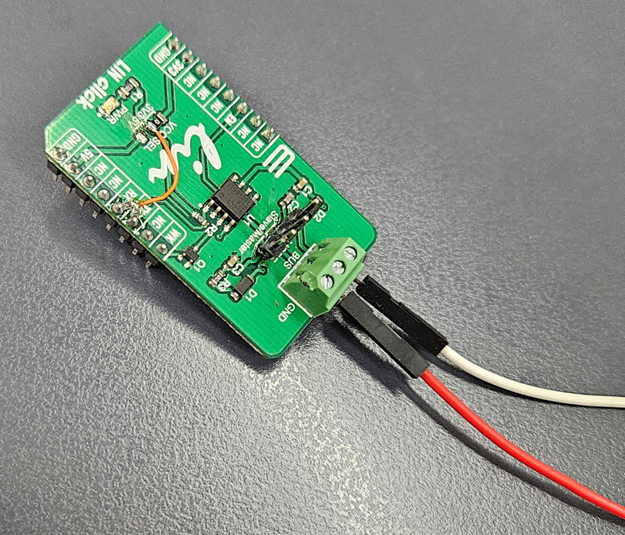
The port connected with the red line is LIN BUS and the part connected with the white line is VS, but I had a hard time because of VS;;; There are pins on the back of the transceiver that connect to the FPGA board.
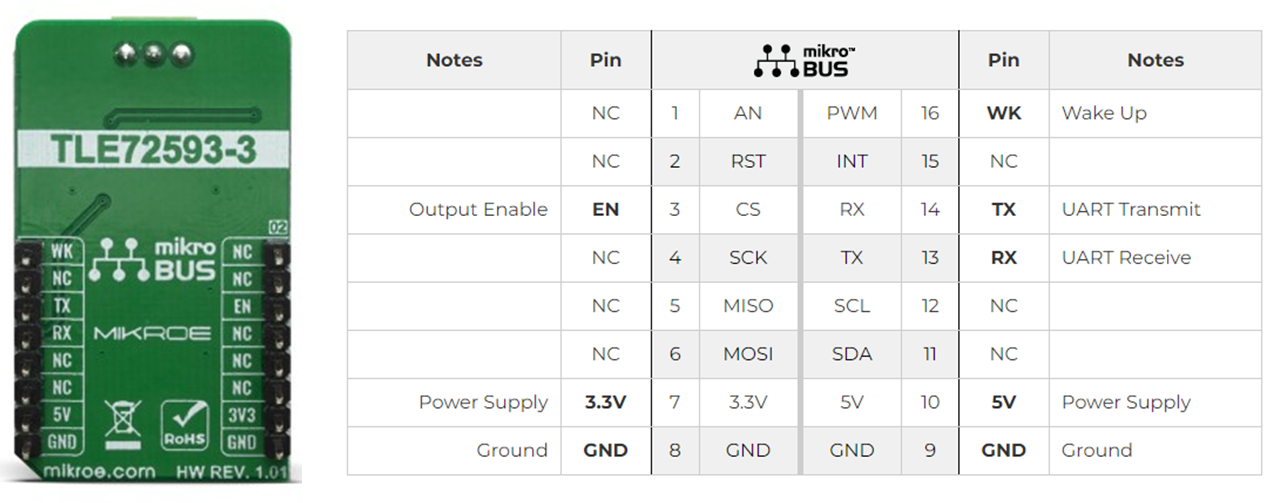
Among the transceiver pins, one of EN, 3.3V, GND, and TX/RX pins are used. I thought I should also use the WK pin, but it didn't affect the actual test. I connected the 3.3V power supply to the EN and 3.3V pins, GND to GND, and TX/RX to the FPGA. When Power and GND are connected, the LED lights up.
At first, there was no specific explanation for the VS pin on the LIN BUS Connector, so I tested it without using VS, but there was no signal. After looking into it, I found out that you need to input a reference voltage to the VS pin. So, the LIN BUS is inout and VS is input. The LIN BUS voltage is determined by the voltage input to VS. I used 10V.
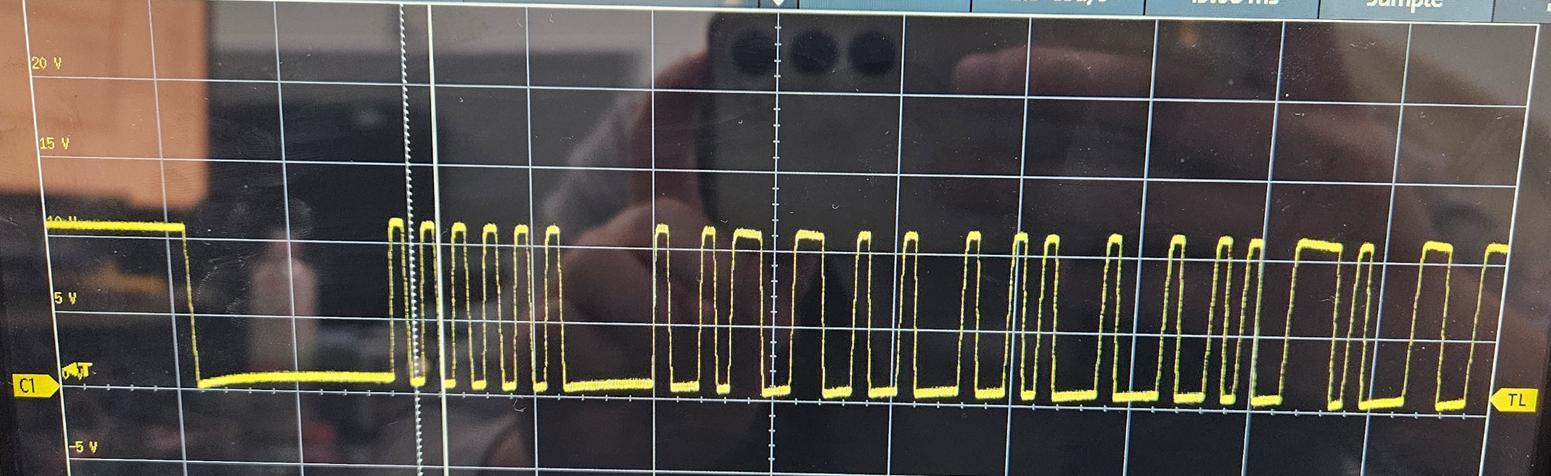
So the signal that goes through the transceiver and into the FPGA is:

However, there is one thing to note. I thought the transceiver's TX/RX only outputs and inputs, but the transceiver RX sends out the BUS signal as is. However, there is a delay between TX - BUS - RX, so problems may occur in the case of the RX from the Master's perspective.
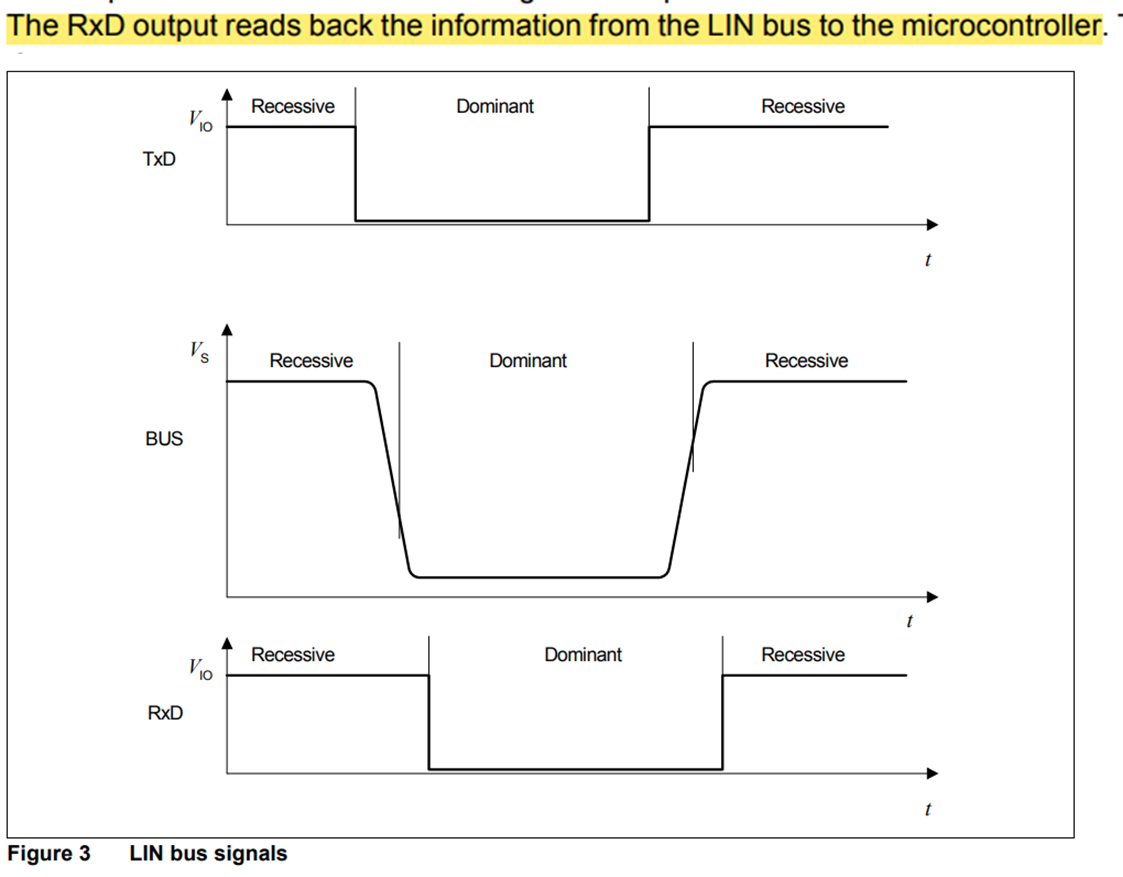
Because of this delay, I needed to fix the rtl,,,, The text became too long, so if you have any questions about the problem, please feel free to ask by email!!
Test with PLIN
Setting up the verification environment
Now, it's the final part of the IP verification. So far, I've been conducting data transfer tests by connecting the controllers I designed, but what about connecting them to other controllers? I used PEAK's PCAN USB PRO FD (hereafter, PLIN) for my tests.
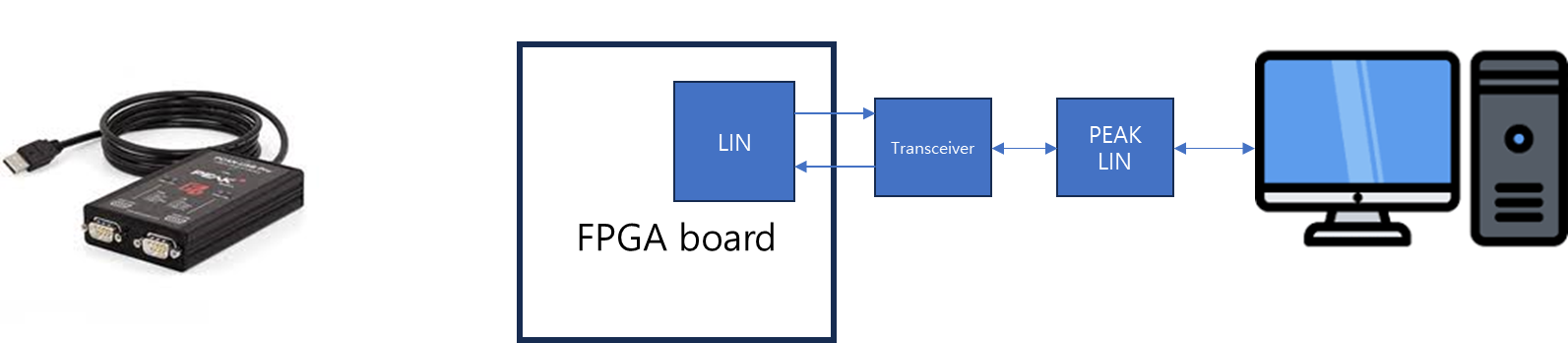
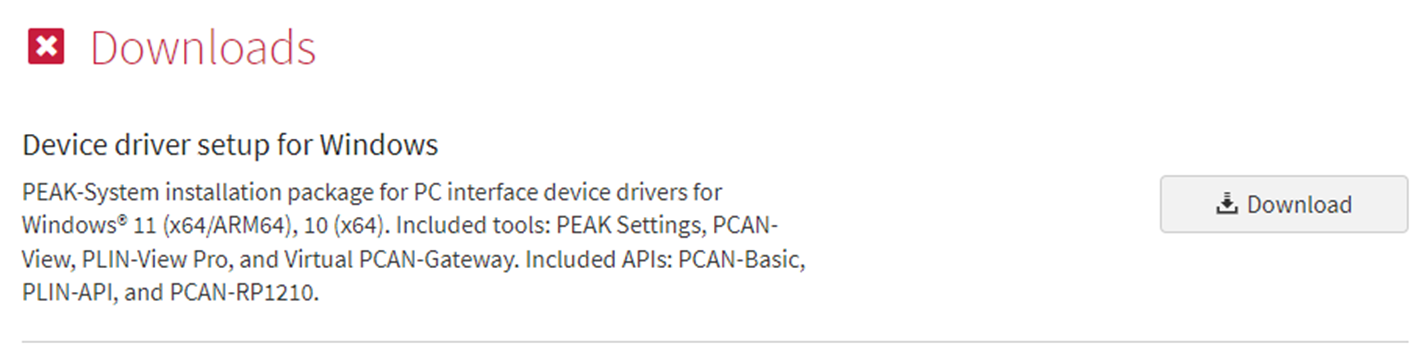
Even if you have PLIN, you still need a control program, right?? You can download the installation file from the PEAK homepage.
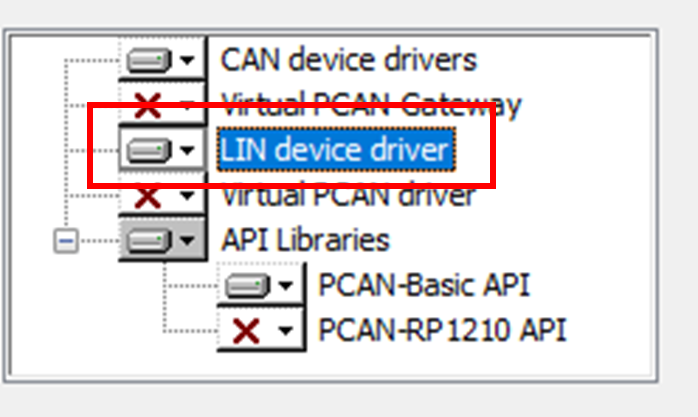
When downloading and installing the file, you must set the LIN device driver option to use the control program.
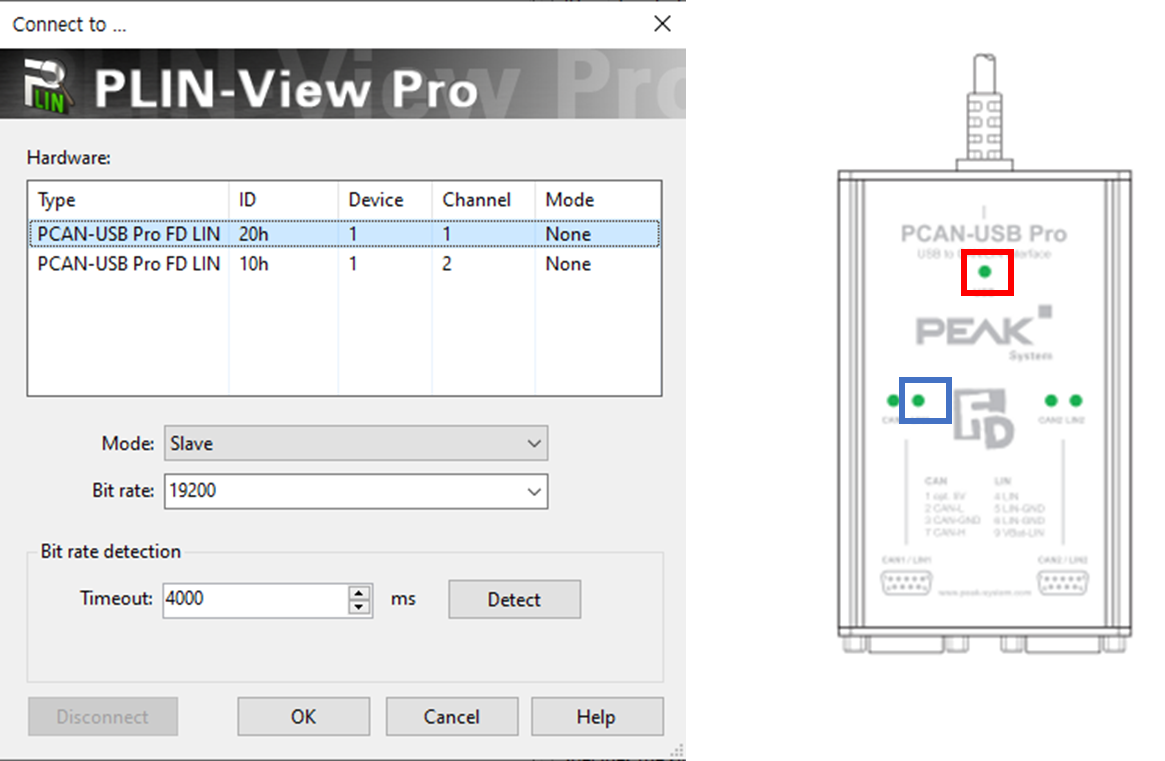
When you connect PLIN to your PC, the green light in the red box, as shown in the photo below, will blink. Confirm this blinking and run the installed program. Select the port to use, set master or slave, set the communication speed, and then click Connect. The green light in the blue box will blink. This completes the program's preparation.
Communication after frame creation
Once the connection is complete, you will see a window like the following. Here you can create a frame and start communication.
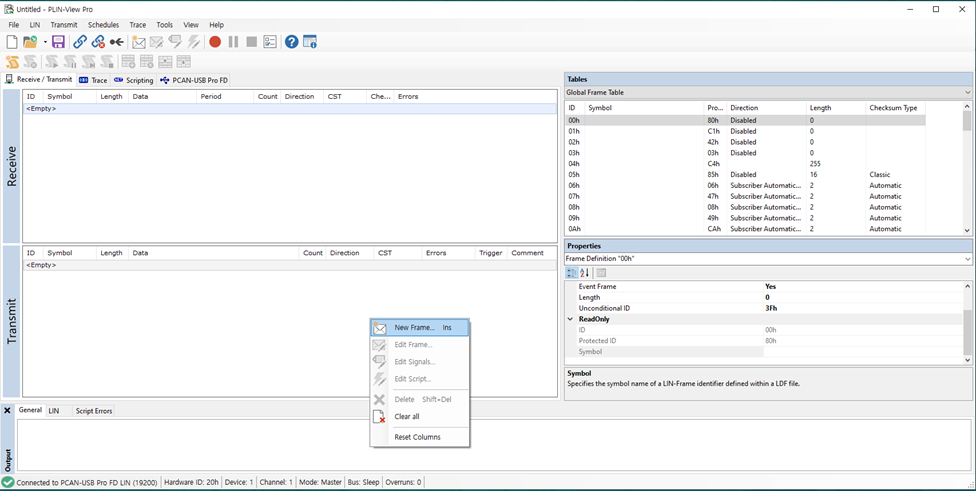

Tx Frame
First, set the control program to master and set the PID to 0x20. Set both Classic and Enhanced checksum to Classic and set Direction to Publisher, indicating that the PLIN will send data. Length will automatically change based on the PID.
If you set it like this, the data input part will be activated, set it to 0x33, 0x22, 0x11, 0xCA and complete the frame setting.
Rx Frame
When setting to Rx, set Direction to Subscriber. In this case, the data input section will be disabled.
After completing the frame settings, you can see that the frame has been created in the frame list as follows.
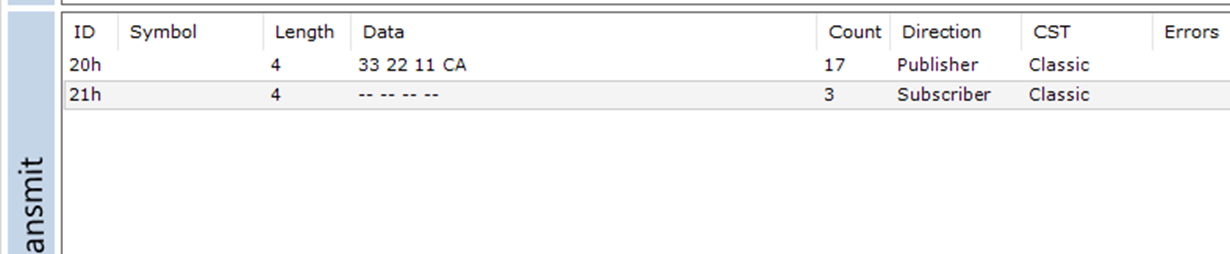
After verifying the frame, connect the controller you want to test to the BUS. The port is RS232 format, and the pin mapping is as follows.
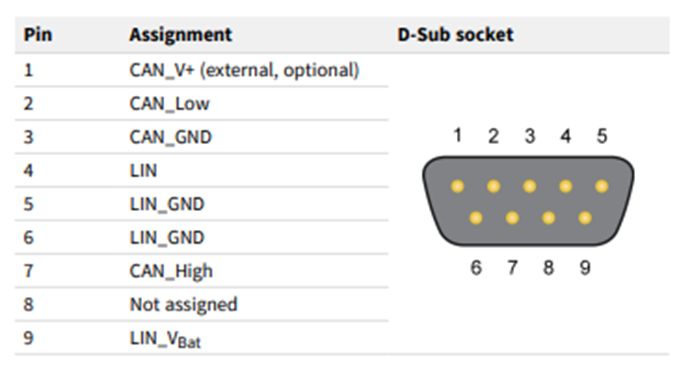
For connection, you can use pins 4, 5, or 6, 9.
- Pin 4: BUS
- Pin 5 or 6: GND
- Pin 9: Vref
The Vref input to pin 9 should be the same voltage as the transceiver voltage of the controller you are testing, right?? Once you have prepared the test environment like this, select the frame you created earlier and press the spacebar to start communication. Then, the communication result will be displayed in the Receive section. The picture below is the communication result of the 0x21 – master rx frame.
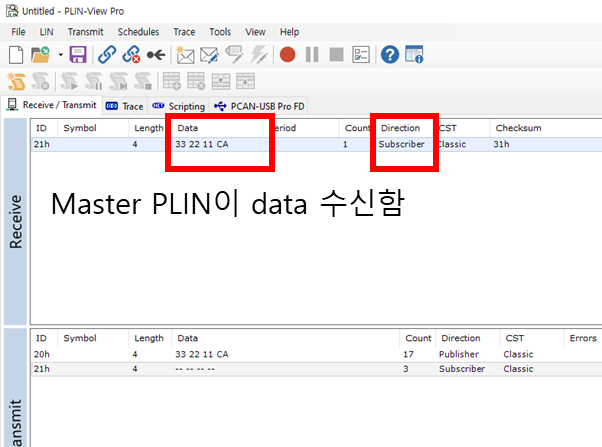
By performing PLIN tests like this, I was able to verify that the controller I designed complies with the protocol specification. This testing method certainly helped me find bugs that I hadn't discovered when testing my two controllers together.
There were several, one of which was the checksum calculation method. I had to add all the data and invert it at the very end, but I didn't do that;; I'm glad I found it.
References: LIN specification
![[RTL] Register Slice의 3가지 선택지](data:image/svg+xml;base64,PHN2ZyB4bWxucz0iaHR0cDovL3d3dy53My5vcmcvMjAwMC9zdmciIHZpZXdCb3g9IjAgMCA1ODkgMTA2IiB3aWR0aD0iNTg5IiBoZWlnaHQ9IjEwNiIgYnYtaW1nLXVybD0iaHR0cHM6Ly9ydGxlYXJuZXIuY29tL3dwLWNvbnRlbnQvdXBsb2Fkcy9hbF9vcHRfY29udGVudC9JTUFHRS9ydGxlYXJuZXIuY29tL3dwLWNvbnRlbnQvdXBsb2Fkcy8yMDI2LzA5L2ltYWdlLmpwZy5idi53ZWJwIiBidi1yZXNpemVkLWluZm9zPSJZblpmY21WemFYcGxaRjl0YjJKcGJHVXVhbkJuT2pRNE1DbzROanRpZGw5eVpYTnBlbVZrWDJsd1lXUXVhbkJuT2pVNE9Tb3hNRFk3WW5aZmNtVnphWHBsWkY5a1pYTnJkRzl3TG1wd1p6bzFPRGtxTVRBMiI+PC9zdmc+)


![[Verilog] 비동기 신호 처리: CDC와 Metastability](data:image/svg+xml;base64,PHN2ZyB4bWxucz0iaHR0cDovL3d3dy53My5vcmcvMjAwMC9zdmciIHZpZXdCb3g9IjAgMCA3MjcgMzIyIiB3aWR0aD0iNzI3IiBoZWlnaHQ9IjMyMiIgYnYtaW1nLXVybD0iaHR0cHM6Ly9ydGxlYXJuZXIuY29tL3dwLWNvbnRlbnQvdXBsb2Fkcy9hbF9vcHRfY29udGVudC9JTUFHRS9ydGxlYXJuZXIuY29tL3dwLWNvbnRlbnQvdXBsb2Fkcy8yMDI1LzEyL2ltZy5qcGcuYnYud2VicCIgYnYtcmVzaXplZC1pbmZvcz0iTkRnd0xtcHdaem8wT0RBcU1qRXpPemd5TUM1cWNHYzZOekkzS2pNeU1qc3hOVE0yTG1wd1p6bzNNamNxTXpJeSI+PC9zdmc+)